Hybrid cluster playbook
Install and join process for the physical node.
Physical worker node (bare-metal)
To support more demanding applications within your cluster, such as PostgreSQL databases, GitLab, or CPU-based LLMs, your worker node will need more memory than the standard 4 GB.
A minimum of 16 GB RAM is required, though 64 GB or more is recommended if you plan to run LLMs on the CPU.
If you are running Parallels on a Mac Studio, allocate additional memory to the virtual worker node now.
Otherwise, consider using a physical (bare-metal) worker node instead.
A spare desktop or old computer is often sufficient, provided it has at least 16 GB of RAM.
This system will run the same Ubuntu Server version used in your virtual environment, but on Intel or AMD architecture rather than Apple Silicon.
Preparation
- Download the correct server ISO image for your architecture
- I have an old Intel i7 desktop and this will require the use of an amd64 ISO
- Open a browser and navigate to: Ubuntu 24.04.3 LTS
- The default download link is for amd64 systems: amd64 ISO
- Create a bootable USB flash drive
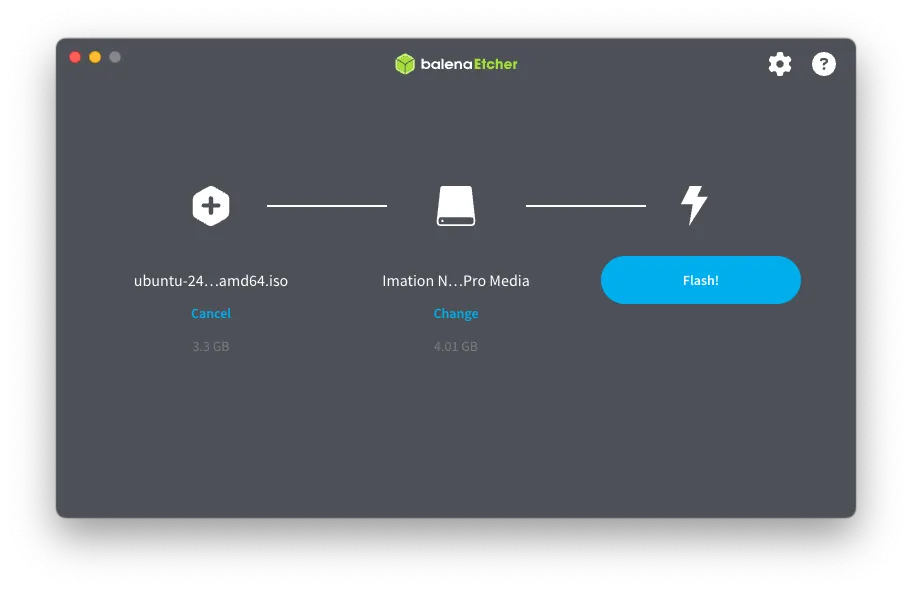
- As I am using macOS I will be using an application called
balenaEtcherto create the bootable USB - If you installing onto a physical server with a LOM (Lights Out Management) then a USB drive is not required. Simply mount the ISO via the LOM, select it as a once-off boot drive and restart the server
- As I am using macOS I will be using an application called
- Insert the USB into a port on the physical machine
- Connect a keyboard, mouse and monitor
- Power on, pressing the appropriate key to enter the boot menu, where you will select the USB and then continue to boot
Install Ubuntu Server on Bare Metal
The Ubuntu tutorial can be found here: Tutorial
- Follow Stages 1 to 6 in the tutorial
- Stage 7 of the tutorial make a note of the ethernet adapter and IP address (assuming your router provides DHCP addresses). The IP address will be manually configured in a later step
- My physical node has an interface of
eno1and DHCP of192.168.1.76
- My physical node has an interface of
- Stage 8: guided storage configuration, select:
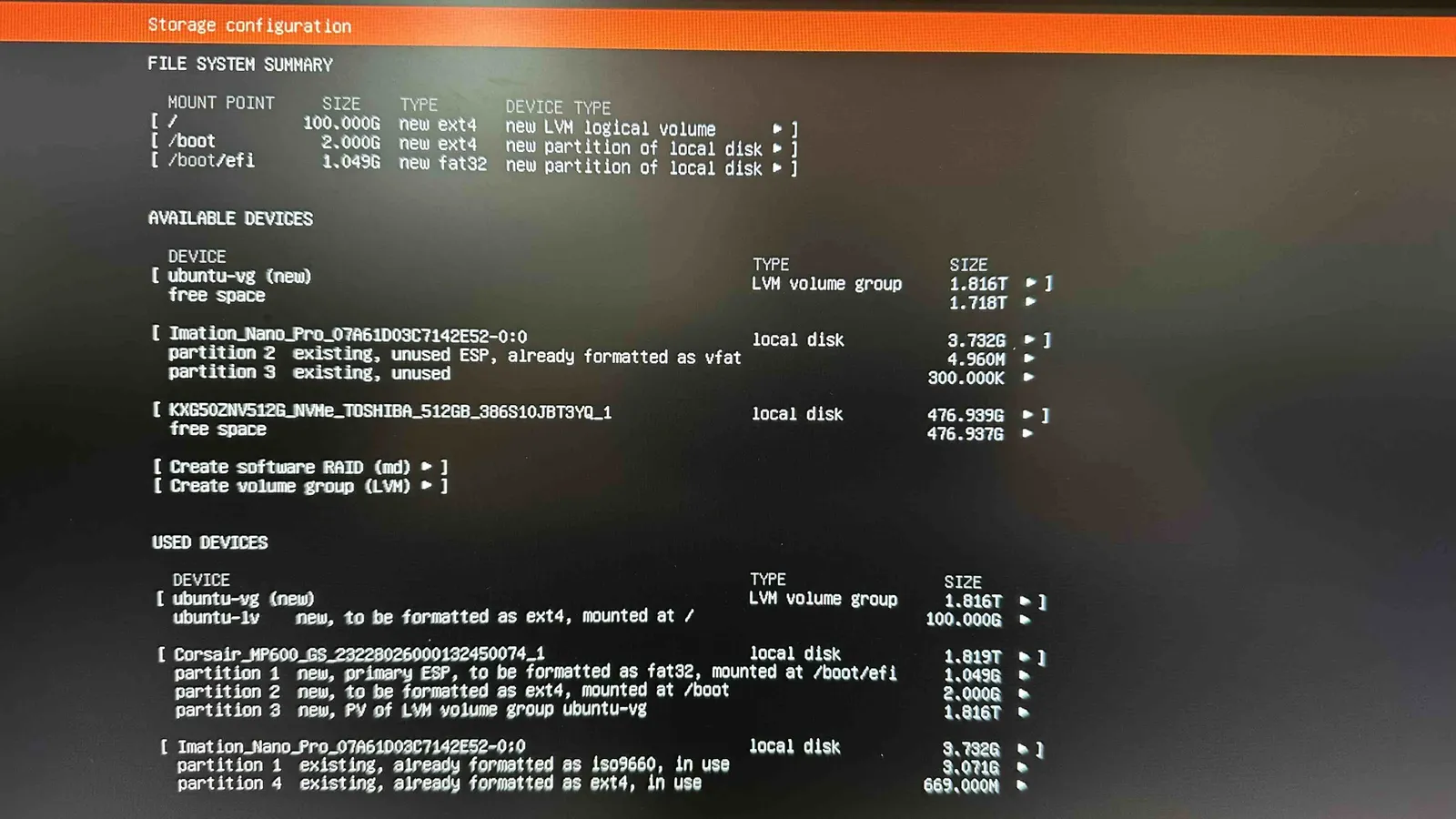
Use an entire disk - Stage 10: confirm partitions. You may have multiple storage devices available, one will be the USB drive, in my case I have two NVMe drives installed and one is allocated to an older ubuntu install (ubuntu-vg)
-
Do NOT press Done until you have configured your chosen storage device to use its full size. Note how the size of my ubuntu-vg is 1.816T but the new format will only use 100G of it - Move the cursor to the Used Devices section and select
ubuntu-lvthen edit it - Change the size to the max, in my case, 1.816T and save - Now you can proceed to the next stage after confirming your changes -
Stage 12: setup a profile. I am going to use the same name (
dev) and password as the virtual template, the only difference being the server name- As this the role of this server will be a worker node in my dev environment I will choose:
worker-gpu-1
- As this the role of this server will be a worker node in my dev environment I will choose:
-
The ISO differs from the tutorial at this point
- Install Ubuntu Pro - select:
No - SSH configuration - select the tick box next to
Install OpenSSH server - Featured server snaps - do not select any
- Install Ubuntu Pro - select:
-
Stage 13: Install software. The install will now commence automatically
-
Stage 14: Install complete. Select
Reboot Nowand remove the USB -
If all is well the server console will display:
Ubuntu 24.04.3 LTS worker-gpu-1 tty1 -
Press return for the login prompt
-
Confirm SSH from your workstation to the new server:
ssh dev@192.168.1.76

Setup physical worker node
The worker node was previously defined:
| Purpose | IP Address | Hostname | FQDN/notes |
|---|---|---|---|
| Subnet | 192.168.1.0/24 | – | Defines local network range |
| Default Gateway | 192.168.1.254 | – | Router or gateway for external access |
| FQDN | – | – | internal.example.com |
| Cluster Name | 192.168.1.200 | dev | dev.internal.example.com |
| Worker Node (p1) | 192.168.1.207 | worker-1 | worker-gpu-1.internal.example.com |
Before we disconnect the keyboard, mouse and monitor and manage the server through SSH we need to follow a similar process to the template.
-
ssh using username: dev and password
-
Start interactive shell as root:
sudo -i -
Update packages:
apt update -
Upgrade packages:
apt upgrade -
Install additional packages:
apt install net-tools traceroute ntp locate -
Check ethernet name and IP address:
ifconfig -
Run the following command to edit the Netplan config:
vi /etc/netplan/50-cloud-init.yaml -
Then change the contents in the file to your IP and gateway, the ethernet adapter in my physical server is:
eno1 -
From:
network:version: 2ethernets:eno1:dhcp4: true -
To:
network:version: 2ethernets:eno1:addresses:- '192.168.1.207/24'routes:- to: 'default'via: '192.168.1.254'- Apply the changes:
netplan apply
- Apply the changes:
-
At this point the SSH session will stop responding as the IP address has changed
-
Add the DNS name
worker-gpu-1to your router and SSH to the server using the new IP address and login:ssh dev@worker-gpu-1.internal.example.com -
Upon success the keyboard, mouse and monitor can be disconnected from the server
-
Server preparation continued from ssh session
- Connect to the server in a new terminal session:
ssh dev@worker-gpu-1.internal.example.com - Login with username:
devand password - Switch to
rootuser:sudo -i - Check routing table:
ip route - Check ping to google:
ping 8.8.8.8 - Check time and date:
timedatectl - Check swap usage:
swapon - Disable swap temporarily (reboot clears it):
swapoff -a - Disable swap perm
vi /etc/fstab
- Comment out swap
# /swap.img none swap sw 0 0
- Prepare DNS - router provides DNS
mkdir /etc/systemd/resolved.conf.dvi /etc/systemd/resolved.conf.d/dns_servers.conf[Resolve]DNS=192.168.1.254Domains=~.
- Enable and restart services
systemctl enable systemd-resolvedsudo systemctl restart systemd-resolved
- Confirm local name resolution:
ping lab.internal.example.com - Confirm external name resolution:
ping www.google.com.au - Configure NTP (note NTP is now part of NTPSEC)
vi /etc/ntpsec/ntp.conf
- Add local NTP server and comment out the defaults - my router provides NTP
pool 192.168.1.254 iburst# pool 0.ubuntu.pool.ntp.org iburst# pool 1.ubuntu.pool.ntp.org iburst# pool 2.ubuntu.pool.ntp.org iburst# pool 3.ubuntu.pool.ntp.org iburst# server ntp.ubuntu.com
- Restart NTP services for changes to take effect:
service ntp restart - Check that NTP services are being picked up:
ntpq -p - Set timezone:
timedatectl set-timezone Australia/Perth - Check time and date:
timedatectl - Update database for locate package:
updatedb - Add additional user:
adduser YOUR_USER - Add new user to sudo list:
usermod -aG sudo andy - Disable IPv6
vi /etc/default/grub
- Change the default
GRUB_CMDLINE_LINUX_DEFAULT="console=tty1 ipv6.disable=1 quiet splash"
- Update grub for changes to take effect:
update-grub - Disable cloud init:
touch /etc/cloud/cloud-init.disabled - Install NFS:
apt install nfs-common -y - Reboot the server to ensure all changes have taken effect:
reboot
Add new server to k8s cluster as a worker node
- New Node: Process to deploy additional node. A new physical worker node (
worker-gpu-1) is to be added to the cluster- Ensure the following steps have been completed before running the playbook
- Prepare the node to be added: Completed
- Power on the ansible server:
ansible-1and login asdev - Activate the virtual environment
source venv/bin/activate
- Add the new node to the ansible server host file
sudo vi /etc/hosts192.168.1.200 dev dev.internal.example.com192.168.1.201 lb-1 lb-1.internal.example.com192.168.1.203 master-1 master-1.internal.example.com192.168.1.206 worker-1 worker-1.internal.example.com192.168.1.207 worker-gpu-1 worker-gpu-1.internal.example.com
- Deploy the ssh-key to the node, and test ssh to it
cd ~/.ssh/ssh-copy-id worker-gpu-1
- Does the new node allow SSH connection from the ansible server:
ssh worker-gpu-1 - Update the
inventory/devcluster/inventory.iniwith the role of the new nodevi ~/kubespray-devcluster/kubespray/inventory/devcluster/inventory.ini[kube_control_plane]master-1 ansible_host=192.168.1.203 etcd_member_name=etcd1[etcd:children]kube_control_plane[kube_node]worker-1 ansible_host=192.168.1.206worker-gpu-1 ansible_host=192.168.1.207
- Change to the kubespray directory
cd ~/kubespray-devcluster/kubespray/
- Refresh facts for all hosts before limiting. Running facts.yml ensures all nodes (old + new) have up-to-date facts cached:
ansible-playbook -i inventory/devcluster/inventory.ini playbooks/facts.yml -b -u dev -KPLAY RECAP ********************************************************************************************************************************master-1 : ok=25 changed=1 unreachable=0 failed=0 skipped=21 rescued=0 ignored=0worker-gpu-1 : ok=25 changed=3 unreachable=0 failed=0 skipped=21 rescued=0 ignored=0worker-1 : ok=37 changed=1 unreachable=0 failed=0 skipped=27 rescued=0 ignored=0Sunday 05 October 2025 05:10:01 +0000 (0:00:00.783) 0:00:11.993 ********===============================================================================system_packages : Manage packages -------------------------------------------------------------------------------------------------- 5.88sGather necessary facts (hardware) -------------------------------------------------------------------------------------------------- 0.78sbootstrap_os : Fetch /etc/os-release ----------------------------------------------------------------------------------------------- 0.67ssystem_packages : Gather OS information -------------------------------------------------------------------------------------------- 0.61sbootstrap_os : Assign inventory name to unconfigured hostnames (non-CoreOS, non-Flatcar, Suse and ClearLinux, non-Fedora) ---------- 0.46snetwork_facts : Gather ansible_default_ipv6 ---------------------------------------------------------------------------------------- 0.44sGather minimal facts --------------------------------------------------------------------------------------------------------------- 0.35snetwork_facts : Gather ansible_default_ipv4 ---------------------------------------------------------------------------------------- 0.35sGather necessary facts (network) --------------------------------------------------------------------------------------------------- 0.33sbootstrap_os : Gather facts -------------------------------------------------------------------------------------------------------- 0.32sbootstrap_os : Create remote_tmp for it is used by another module ------------------------------------------------------------------ 0.27sbootstrap_os : Ensure bash_completion.d folder exists ------------------------------------------------------------------------------ 0.21sbootstrap_os : Check if bootstrap is needed ---------------------------------------------------------------------------------------- 0.12sbootstrap_os : Check http::proxy in apt configuration files ------------------------------------------------------------------------ 0.10sbootstrap_os : Check https::proxy in apt configuration files ----------------------------------------------------------------------- 0.08sbootstrap_os : Include vars -------------------------------------------------------------------------------------------------------- 0.05sbootstrap_os : Include tasks ------------------------------------------------------------------------------------------------------- 0.05sdynamic_groups : Match needed groups by their old names or definition -------------------------------------------------------------- 0.05sCheck that python netaddr is installed --------------------------------------------------------------------------------------------- 0.05svalidate_inventory : Check that kube_pods_subnet does not collide with kube_service_addresses -------------------------------------- 0.03s
- Run the scale playbook:
ansible-playbook -i inventory/devcluster/inventory.ini scale.yml -b -u dev -K --limit worker-gpu-1PLAY RECAP ********************************************************************************************************************************worker-gpu-1 : ok=378 changed=77 unreachable=0 failed=0 skipped=639 rescued=0 ignored=0Sunday 05 October 2025 05:16:04 +0000 (0:00:00.020) 0:05:00.164 ********===============================================================================download : Download_container | Download image if required ------------------------------------------------------------------------ 41.86sdownload : Download_file | Download item ------------------------------------------------------------------------------------------ 29.30sdownload : Download_container | Download image if required ------------------------------------------------------------------------ 28.09sdownload : Download_file | Download item ------------------------------------------------------------------------------------------ 26.84sdownload : Download_container | Download image if required ------------------------------------------------------------------------ 23.36sdownload : Download_file | Download item ------------------------------------------------------------------------------------------ 11.61sdownload : Download_file | Download item ------------------------------------------------------------------------------------------ 10.60snetwork_plugin/calico : Wait for calico kubeconfig to be created ------------------------------------------------------------------- 7.31scontainer-engine/containerd : Download_file | Download item ------------------------------------------------------------------------ 7.08sdownload : Download_container | Download image if required ------------------------------------------------------------------------- 5.02scontainer-engine/crictl : Download_file | Download item ---------------------------------------------------------------------------- 4.57sdownload : Download_container | Download image if required ------------------------------------------------------------------------- 3.83scontainer-engine/nerdctl : Download_file | Download item --------------------------------------------------------------------------- 3.73scontainer-engine/runc : Download_file | Download item ------------------------------------------------------------------------------ 3.68scontainer-engine/validate-container-engine : Populate service facts ---------------------------------------------------------------- 3.31snetwork_plugin/cni : CNI | Copy cni plugins ---------------------------------------------------------------------------------------- 2.41scontainer-engine/containerd : Containerd | Unpack containerd archive --------------------------------------------------------------- 2.35scontainer-engine/crictl : Extract_file | Unpacking archive ------------------------------------------------------------------------- 2.31scontainer-engine/nerdctl : Extract_file | Unpacking archive ------------------------------------------------------------------------ 1.93skubernetes/kubeadm : Join to cluster if needed ------------------------------------------------------------------------------------- 1.76s
- Ensure the following steps have been completed before running the playbook
Kubespray remove virtual worker node
Now that the physical worker node is operational we can remove the virtual worker node from the cluster. It is currently running 11 pods so the node will need to be drained first.
- Remove Node: Process to remove a single node
-
Power on the ansible server:
ansible-1and login asdev -
Activate the virtual environment
source venv/bin/activate -
Change to the kubespray directory
cd ~/kubespray-devcluster/kubespray/ -
Run the remove node playbook to remove the node from the cluster (cordon, drain, delete node, etc):
ansible-playbook -i inventory/devcluster/inventory.ini remove-node.yml -b -u dev -K -e "node=worker-1"- Press yes to continue
PLAY RECAP ****************************************************************************************************************************************************master-1 : ok=23 changed=1 unreachable=0 failed=0 skipped=23 rescued=0 ignored=0worker-gpu-1 : ok=23 changed=1 unreachable=0 failed=0 skipped=23 rescued=0 ignored=0worker-1 : ok=73 changed=19 unreachable=0 failed=0 skipped=43 rescued=0 ignored=1localhost : ok=1 changed=0 unreachable=0 failed=0 skipped=0 rescued=0 ignored=0Sunday 05 October 2025 06:01:45 +0000 (0:00:00.161) 0:00:58.494 ********===============================================================================remove_node/pre_remove : Remove-node | Drain node except daemonsets resource -------------------------------------------------------------------------- 18.21sConfirm Execution ------------------------------------------------------------------------------------------------------------------------------------- 12.29sreset : Reset | delete some files and directories ------------------------------------------------------------------------------------------------------ 8.08sGather information about installed services ------------------------------------------------------------------------------------------------------------ 2.39ssystem_packages : Manage packages ---------------------------------------------------------------------------------------------------------------------- 1.18sreset : Reset | remove containerd binary files --------------------------------------------------------------------------------------------------------- 1.03sreset : Reset | stop services -------------------------------------------------------------------------------------------------------------------------- 0.83sreset : Reset | remove services ------------------------------------------------------------------------------------------------------------------------ 0.82sGather necessary facts (hardware) ---------------------------------------------------------------------------------------------------------------------- 0.78sreset : Reset | stop all cri pods ---------------------------------------------------------------------------------------------------------------------- 0.75sreset : Reset | stop containerd and etcd services ------------------------------------------------------------------------------------------------------ 0.72sreset : Gather active network services ----------------------------------------------------------------------------------------------------------------- 0.71sbootstrap_os : Assign inventory name to unconfigured hostnames (non-CoreOS, non-Flatcar, Suse and ClearLinux, non-Fedora) ------------------------------ 0.52sreset : Reset | force remove all cri pods -------------------------------------------------------------------------------------------------------------- 0.50sGather necessary facts (network) ----------------------------------------------------------------------------------------------------------------------- 0.49sreset : Flush iptables --------------------------------------------------------------------------------------------------------------------------------- 0.46sreset : Reset | systemctl daemon-reload ---------------------------------------------------------------------------------------------------------------- 0.45ssystem_packages : Gather OS information ---------------------------------------------------------------------------------------------------------------- 0.43sbootstrap_os : Create remote_tmp for it is used by another module -------------------------------------------------------------------------------------- 0.38sreset : Set IPv4 iptables default policies to ACCEPT --------------------------------------------------------------------------------------------------- 0.38s
- Press yes to continue
-
This step is optional if you plan to reuse the node, otherwise you can just shutdown and delete the VM, or redeploy using an ISO.
- DANGEROUS action. Wipe the node you removed (cleans kubelet/containerd configs, iptables, CNI, etc). Important - when resetting just one node, always use both the limit and the variable
ansible-playbook -i inventory/devcluster/inventory.ini reset.yml -b -u dev -K --limit worker-1 -e reset_nodes=worker-1 -e reset_confirmation=yes
- DANGEROUS action. Wipe the node you removed (cleans kubelet/containerd configs, iptables, CNI, etc). Important - when resetting just one node, always use both the limit and the variable
-
- Final cleanup
- Update inventory: remove worker-1 from
inventory.ini[kube_control_plane]master-1 ansible_host=192.168.1.203 etcd_member_name=etcd1[etcd:children]kube_control_plane[kube_node]worker-gpu-1 ansible_host=192.168.1.207 - Remove ssh key relating to removed node
ssh-keygen -f "/home/dev/.ssh/known_hosts" -R "worker-1"# Host worker-1 found: line 8/home/dev/.ssh/known_hosts updated.Original contents retained as /home/dev/.ssh/known_hosts.old
- Remove from host file:
sudo vi /etc/hosts192.168.1.200 dev dev.internal.example.com192.168.1.201 lb-1 lb-1.internal.example.com192.168.1.203 master-1 master-1.internal.example.com192.168.1.207 worker-gpu-1 worker-gpu-1.internal.example.com - Verify removal:
kubectl get nodeskubectl get csr | grep -i worker-1 || trueNAME STATUS ROLES AGE VERSIONmaster-1 Ready control-plane 13m v1.32.9worker-gpu-1 Ready <none> 12m v1.32.9
- Update inventory: remove worker-1 from