Slack notifications for GitLab pipelines
Webhooks and bot tokens
For programmatic posting and richer features use a Bot token (xoxb-…). Keep secrets in CI variables. Works with the Slack free plan.
1. Slack: create a workspace
- Sign up for Slack and create or join a workspace.
- You can add the same account to multiple devices and browsers.
- Create or use an existing channel for notifications.
- To the right of the channel are 3 vertical dots, click on them and expand on
Copythen click onCopy link. - Paste the text to a note and copy/save the channel ID:
C0123ABCDas this will be needed in a later step.
- To the right of the channel are 3 vertical dots, click on them and expand on
Free plan works for webhooks and a bot that posts messages.
2. Slack API: create an app
| Type | Use when | What you get |
|---|---|---|
| Bot token | You need Web API methods like chat.postMessage, edits, threads | OAuth token xoxb-… with scopes such as chat:write; optionally chat:write.public. Add incoming-webhook only if you also want a webhook URL. |
Adding the scope chat:write.public to the bot allows the bot to post to the channel even if it is not a member.
In the Developer portal choose Create an app → From scratch. Name it and pick your workspace.
Settings · Basic Information
App Credentials
Store the following securely:
- App ID.
- Client ID.
- Client Secret.
- Signing Secret.
- Verification Token.
Display Information
- App name: the app name can be different than the API app name.
- Short description.
- App icon & preview: square image (PNG) that renders at small sizes.
- Background colour: pick a colour that assists visibility of your text.
Features · OAuth & Permissions
OAuth Tokens
Store the following securely:
- Bot User OAuth Token:
xoxb-REDACTED
Scopes
Bot Token Scopes
Add the following (start minimal and expand as needed):
chat:writechat:write.public(optional; lets the bot post where it is not a member)incoming-webhook(optional; only if you want a webhook URL too)- In the app left sidebar open Incoming Webhooks and toggle Activate Incoming Webhooks.
- Click Add New Webhook to Workspace, choose the target channel, then Allow. Copy the URL (
https://hooks.slack.com/services/T…/B…/X…).
Testing
Use the saved channel ID from earlier to test.
Webhook test
curl -X POST -H 'Content-type: application/json' --data '{"text":"Hello from CI"}' https://hooks.slack.com/services/T00000000/B00000000/XXXXXXXXXXXXXXXXXXXXXXXX
A successful response returns ok.
Bot test
Prefer channel ID not
#name
curl -X POST https://slack.com/api/chat.postMessage -H "Authorization: Bearer xoxb-xxxxxxxx" -H "Content-Type: application/json; charset=utf-8" -d '{"channel":"C0123ABCD","text":"Hello from a bot"}'
If you receive not_in_channel, invite the bot to that channel or add the chat:write.public scope and reinstall.
To list channels and copy the correct ID, add channels:read and reinstall. To reply in a thread, include thread_ts in your JSON body.
3. GitLab GUI
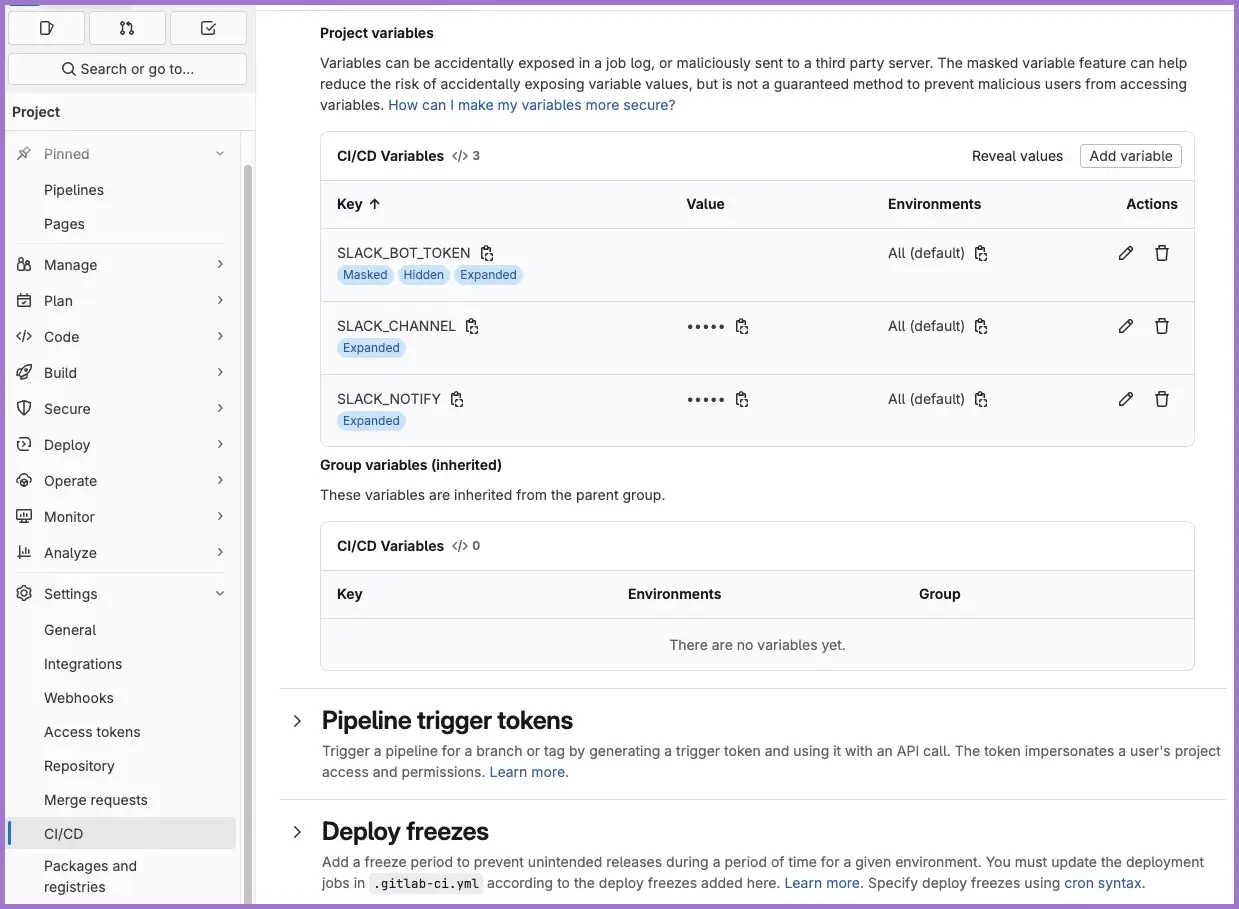
Required CI/CD variables
Replace xoxb-REDACTED and C0123ABCD with your own values.
- From the
Projectnavigate toSettingsand click onCI/CD. - Expand
Variablessection. - Click
Add variableand add each of the following:Key: SLACK_BOT_TOKEN;Value:xoxb-REDACTED; expanded, masked and hidden but not protectedKey: SLACK_CHANNEL;Value:C0123ABCD; expanded but not protectedKey: SLACK_NOTIFY;Value:true; expanded but not protected
4. GitLab CI
Add to your existing
.gitlab-ci.yml
# .gitlab-ci.yml
stages: [notify, build, notify_end]

image: node:22-alpine

cache:
  key: ${CI_COMMIT_REF_SLUG}
  paths:
    - site/node_modules/

# --- Slack threaded notifications (bot token) ---
# Required CI/CD variables - replace with your own:
#   SLACK_NOTIFY=true
#   SLACK_BOT_TOKEN=xoxb-...
#   SLACK_CHANNEL=C0123ABC

notify:start:
  stage: notify
  image: alpine:3.20
  rules:
    - if: '$SLACK_NOTIFY == "true"'
  before_script:
    - apk add --no-cache curl jq
  script:
    - |
      MSG="*Pipeline* <${CI_PIPELINE_URL}|#${CI_PIPELINE_ID}> for *${CI_PROJECT_PATH}* started on ${CI_COMMIT_REF_NAME} by ${GITLAB_USER_LOGIN}."
      MORE="${CI_COMMIT_SHORT_SHA}: $(echo "$CI_COMMIT_TITLE" | head -c 120)"
      jq -n --arg ch "$SLACK_CHANNEL" --arg msg "$MSG" --arg more "$MORE" '{channel:$ch, text:$msg,
          blocks:[
            { "type":"section","text":{"type":"mrkdwn","text":$msg}},
            { "type":"context","elements":[{"type":"mrkdwn","text":$more}]}
          ]}' > payload.json
      curl -sS -H "Authorization: Bearer $SLACK_BOT_TOKEN" -H "Content-type: application/json" -X POST https://slack.com/api/chat.postMessage --data @payload.json | tee slack.resp.json
      jq -r '.ts // empty' slack.resp.json | tee slack.ts
  artifacts:
    paths: [slack.ts, slack.resp.json]
    expire_in: 1 day

pages:
  stage: build
  script:
    - cd site
    - export SITE_URL="https://${CI_PROJECT_NAMESPACE}.pages.${CI_PAGES_DOMAIN:-internal.example.com}"
    - export BASE_URL="/${CI_PROJECT_NAME}/"
    - npm ci
    - npm run build
    - mv build ../public
  artifacts:
    paths: [public]

notify:success:
  stage: notify_end
  image: alpine:3.20
  rules:
    - if: '$SLACK_NOTIFY == "true"'
      when: on_success
  before_script:
    - apk add --no-cache curl jq
  dependencies: ["notify:start"]
  script:
    - |
      TS="$(cat slack.ts 2>/dev/null || true)"
      jq -n --arg ch "$SLACK_CHANNEL" --arg ts "$TS" --arg msg "Pipeline succeeded: <${CI_PIPELINE_URL}|#${CI_PIPELINE_ID}>." '{channel:$ch, thread_ts:$ts, text:$msg}' > payload.json
      curl -sS -H "Authorization: Bearer $SLACK_BOT_TOKEN" -H "Content-type: application/json" -X POST https://slack.com/api/chat.postMessage --data @payload.json >/dev/null

notify:failure:
  stage: notify_end
  image: alpine:3.20
  rules:
    - if: '$SLACK_NOTIFY == "true"'
      when: on_failure
  allow_failure: true
  before_script:
    - apk add --no-cache curl jq
  dependencies: ["notify:start"]
  script:
    - |
      TS="$(cat slack.ts 2>/dev/null || true)"
      jq -n --arg ch "$SLACK_CHANNEL" --arg ts "$TS" --arg msg "Pipeline failed: <${CI_PIPELINE_URL}|#${CI_PIPELINE_ID}>. Stage ${CI_JOB_STAGE}, job ${CI_JOB_NAME}." '{channel:$ch, thread_ts:$ts, text:$msg}' > payload.json
      curl -sS -H "Authorization: Bearer $SLACK_BOT_TOKEN" -H "Content-type: application/json" -X POST https://slack.com/api/chat.postMessage --data @payload.json >/dev/null
5. Testing
5.1 Pre-flight (Slack only)
- Webhook: run the
curltest above and confirm a message lands in your chosen channel. - Bot: run the
chat.postMessagetest with your channel ID; invite the bot if you seenot_in_channel.
5.2 Dry-run the pipeline
- Ensure project variables exist:
SLACK_NOTIFY=true,SLACK_BOT_TOKEN,SLACK_CHANNEL. - In GitLab, go to CI/CD → Pipelines → Run pipeline on your working branch.
- Expected Slack result:
- A new top-level message from
notify:startwith pipeline link and SHA context. - A threaded reply when the pipeline succeeds or fails (from
notify:successornotify:failure).
- A new top-level message from
5.3 Verify thread linkage
- Open the top-level message in Slack and expand the thread. You should see a single reply.
- In GitLab job logs, confirm a timestamp was captured:
cat slack.ts && cat slack.resp.json | jq .
- If
slack.tsis empty, the first post failed; checkslack.resp.jsonfor an error (invalid_auth,channel_not_found).
5.4 Simulate failure path (optional)
- Temporarily add a failing line to any job (for example in
pages):script:- false # simulate a failure to test notify:failure - Re-run the pipeline and confirm a threaded failure reply appears. Revert the change afterwards.
5.5 Common checks
- Channel ID is correct and bot is invited.
- Secrets are masked and not protected (so they apply to branches).
- Slack app is still installed in the workspace; regenerate token/webhook if removed.
Security and ops
- Treat webhook URLs and bot tokens as secrets. Do not commit them. Rotate if leaked.
- Scope minimally. For a bot, start with
chat:writeonly. Add more scopes later if required. - Use JSON bodies. Slack recommends JSON for Web API calls.
- Prefer a private channel for CI alerts and restrict membership.
Troubleshooting
- 403 or
invalid_auth: token wrong or not installed to that workspace. Reinstall. channel_not_found: wrong channel ID or the bot cannot see the channel. Use the channel ID and ensure it is public, or invite the bot.not_in_channel: invite the bot to the channel or addchat:write.publicand reinstall.- Webhook posts do nothing: the app was removed or the webhook was rotated. Reinstall or regenerate.
- Cannot find “Create an app”: use the Developer portal, not the in-Slack Apps page. Admins may restrict custom apps.