WordPress operations
This runbook covers the operational workflows after GitOps deployment. Including restore, maintenance via WP-CLI, backups, and hardening.
WordPress GitOps series
- WordPress GitOps summary
- WordPress repo and prerequisites
- WordPress manifests
- WordPress flux integration
- WordPress operations, restore and backups - you are here
1. Restore workflow (database then content)
This restores the database first, followed by the wp-content PVC. Both backups should be captured close together.
The database backup is named db-backup.sql and the content backup is named content-backup.tar.gz.
1.1 Pre-restore test (fresh install sanity)
Validate that basic WordPress install and media writes work before restoring real data.
Test from your IP address allowed in the Cloudflare portal, then test from a different IP and confirm it is blocked before continuing.
- Open
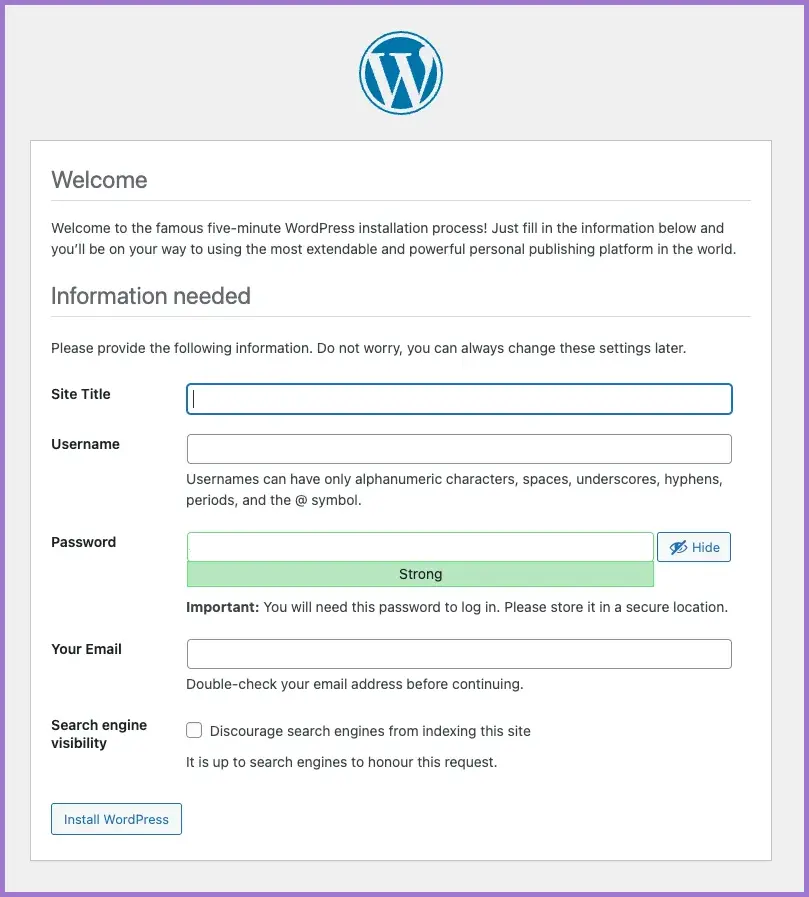
https://public.example.com/wp-admin/install.phpand complete the install wizard.
- Login via
https://public.example.com/wp-admin. - Create a dummy post and confirm media upload works (writes to
/wp-content).
1.2 Suspend Flux (required for toolbox workloads)
This prevents Flux from scaling the restore deployments back to zero while you are working.
flux suspend kustomization wordpress-coach -n flux-system
1.3 Restore database
- Scale deployment to 1 replica and wait for the pod to be ready.
kubectl -n wp-coach scale deploy/db-restore --replicas=1
kubectl -n wp-coach rollout status deploy/db-restore --timeout=120s
- Exec to the pod and confirm connectivity.
POD="$(kubectl -n wp-coach get pod -l app=db-restore -o jsonpath='{.items[0].metadata.name}')"

kubectl -n wp-coach exec -it "$POD" -- sh -lc '
set -eux
getent hosts mariadb
mysqladmin --connect-timeout=3 ping -h mariadb -u"$MARIADB_USER" -p"$MARIADB_PASSWORD"
'
- Drop and create a fresh database to prevent import failures.
kubectl -n wp-coach exec -i "$POD" -- sh -lc '
set -e
mysql -h mariadb -u"$MARIADB_USER" -p"$MARIADB_PASSWORD" -e "
DROP DATABASE IF EXISTS \`$MARIADB_DATABASE\`;
CREATE DATABASE \`$MARIADB_DATABASE\` DEFAULT CHARACTER SET utf8mb4 COLLATE utf8mb4_unicode_520_ci;
"
'
- Stream the database backup into the pod.
pv -pterb ./db-backup.sql | kubectl -n wp-coach exec -i "$POD" -- sh -lc \
  'mysql -h mariadb -u"$MARIADB_USER" -p"$MARIADB_PASSWORD" "$MARIADB_DATABASE"'
- Confirm table count.
kubectl -n wp-coach exec -it "$POD" -- sh -lc \
  'mysql -h mariadb -u"$MARIADB_USER" -p"$MARIADB_PASSWORD" "$MARIADB_DATABASE" -e "SHOW TABLES;" | wc -l'
- Confirm
homeandsiteurl.
kubectl -n wp-coach exec -it "$POD" -- sh -lc \
  'mysql -h mariadb -u"$MARIADB_USER" -p"$MARIADB_PASSWORD" "$MARIADB_DATABASE" -e "
    SELECT option_name, option_value
    FROM wp_options
    WHERE option_name IN (\"siteurl\",\"home\");
  "'
- Only if changing domain names, update
homeandsiteurl.
kubectl -n wp-coach exec -it "$POD" -- sh -lc \
  'mysql -h mariadb -u"$MARIADB_USER" -p"$MARIADB_PASSWORD" "$MARIADB_DATABASE" -e "
    UPDATE wp_options SET option_value=\"https://public.example.com\"
    WHERE option_name IN (\"siteurl\",\"home\");
  "'
- Scale down database restore deployment to zero.
kubectl -n wp-coach scale deploy/db-restore --replicas=0
Database restore completed.
1.4 Restore wp-content
- Create the content tarball locally.
COPYFILE_DISABLE=1 tar --no-xattrs -czf content-backup.tar.gz wp-content
- Scale deployment to 1 replica and wait.
kubectl -n wp-coach scale deploy/wp-content-restore --replicas=1
kubectl -n wp-coach rollout status deploy/wp-content-restore --timeout=120s
- Identify restore pod.
POD="$(kubectl -n wp-coach get pod -l app=wp-content-restore -o jsonpath='{.items[0].metadata.name}')"
- Copy tarball into pod.
pv ./content-backup.tar.gz | kubectl -n wp-coach exec -i "$POD" -- sh -lc 'cat > /tmp/wp-content.tar.gz'
The original document stops after copying the tarball. You still need to extract it under /mnt/wp-content inside the pod, then fix ownership as needed. Keep the extraction command in your restore procedure so this step is not forgotten.
- Restart WordPress deployment.
kubectl -n wp-coach rollout restart deploy/wordpress
kubectl -n wp-coach rollout status deploy/wordpress
- Scale down the restore deployment.
kubectl -n wp-coach scale deploy/wp-content-restore --replicas=0
wp-content restore completed.
1.5 Resume Flux
Resuming will also restore GitOps control of toolbox replicas.
flux resume kustomization wordpress-coach -n flux-system
1.6 Post-restore verification checklist
flux get sources git -n flux-systemincludeswordpress-coachReadyflux get kustomizations -n flux-systemincludeswordpress-coachReadykubectl -n wp-coach get podsshows WordPress and MariaDB Readykubectl -n wp-coach get certificate your-domain-originis Readycurl -I https://public.example.comreturns expected status codes
2. WP CLI pod (maintenance)
This uses wpcli-shell for DB queries, cron debugging, plugin state inspection, and cache operations.
2.1 Suspend Flux and scale up wpcli-shell
flux suspend kustomization wordpress-coach -n flux-system
kubectl -n wp-coach scale deploy/wpcli-shell --replicas=1
2.2 Check for orphaned postmeta and term relationships
Orphans are common on older sites and can occur due to plugin behaviour, interrupted bulk operations, or imperfect migrations/restores.
POD="$(kubectl -n wp-coach get pod -l app=wpcli-shell -o jsonpath='{.items[0].metadata.name}')"

kubectl -n wp-coach exec -it "$POD" -- sh -lc '
set -e

wp db query <<'"'"'SQL'"'"'
SELECT COUNT(*) AS orphan_postmeta
FROM wp_postmeta pm
LEFT JOIN wp_posts p ON p.ID = pm.post_id
WHERE p.ID IS NULL;

SELECT COUNT(*) AS orphan_termrels
FROM wp_term_relationships tr
LEFT JOIN wp_posts p ON p.ID = tr.object_id
WHERE p.ID IS NULL;
SQL
'
2.3 Delete orphaned postmeta and term relationships
POD="$(kubectl -n wp-coach get pod -l app=wpcli-shell -o jsonpath='{.items[0].metadata.name}')"

kubectl -n wp-coach exec -it "$POD" -- sh -lc '
set -e

wp db query <<'"'"'SQL'"'"'
START TRANSACTION;

DELETE pm
FROM wp_postmeta pm
LEFT JOIN wp_posts p ON p.ID = pm.post_id
WHERE p.ID IS NULL;
SELECT ROW_COUNT() AS deleted_orphan_postmeta;

DELETE tr
FROM wp_term_relationships tr
LEFT JOIN wp_posts p ON p.ID = tr.object_id
WHERE p.ID IS NULL;
SELECT ROW_COUNT() AS deleted_orphan_termrels;

COMMIT;
SQL
'
2.4 Scale down and resume GitOps
kubectl -n wp-coach scale deploy/wpcli-shell --replicas=0
flux resume kustomization wordpress-coach -n flux-system
3. Manual backups to workstation
This uses the toolbox deployments to take a logical DB dump and a wp-content tarball.
3.1 Suspend Flux and scale toolbox deployments up
flux suspend kustomization wordpress-coach -n flux-system
kubectl -n wp-coach scale deploy/db-restore --replicas=1
kubectl -n wp-coach scale deploy/wp-content-restore --replicas=1
3.2 Database backup (logical dump)
ns=wp-coach
ts="$(date +%Y%m%d-%H%M%S)"
out="mariadb-${ns}-${ts}.sql.gz"

POD="$(kubectl -n "$ns" get pod -l app=db-restore -o jsonpath='{.items[0].metadata.name}')"

kubectl -n "$ns" exec -i "$POD" -c mysql -- bash -lc '
set -euo pipefail
mysqldump -h mariadb -u"$MARIADB_USER" -p"$MARIADB_PASSWORD" \
  --databases "$MARIADB_DATABASE" \
  --single-transaction --quick --skip-lock-tables \
  --routines --triggers --events \
| gzip -1
' | pv > "${out}.tmp" && mv "${out}.tmp" "$out"

ls -lh "$out"
file "$out"
gzip -t "$out" && echo "OK: gzip integrity"
gzcat "$out" | head -n 30
3.3 wp-content backup (create in pod then kubectl cp)
ns=wp-coach
ts="$(date +%Y%m%d-%H%M%S)"
POD="$(kubectl -n "$ns" get pod -l app=wp-content-restore -o jsonpath='{.items[0].metadata.name}')"
remote="/tmp/wp-content-${ns}-${ts}.tar.gz"
local="wp-content-${ns}-${ts}.tar.gz"

kubectl -n "$ns" exec "$POD" -- sh -lc "
set -eu
tar -czf '$remote' \
  --numeric-owner \
  --exclude='uploads/ssa/logs/*' \
  --exclude='cache/*' \
  --exclude='w3tc-cache/*' \
  -C /mnt/wp-content .
ls -lh '$remote'
"

kubectl -n "$ns" cp "$POD:$remote" "./$local"
ls -lh "./$local"
tar -tzf "./$local" | head -n 20
3.4 Scale down and resume
kubectl -n wp-coach scale deploy/db-restore --replicas=0
kubectl -n wp-coach scale deploy/wp-content-restore --replicas=0
flux resume kustomization wordpress-coach -n flux-system
4. Manual backups using Velero
This creates a namespace backup including PVC data via kopia.
4.1 Create a Velero backup
ts="$(date +%Y%m%d-%H%M%S)"
name="wp-coach-manual-${ts}"

velero backup create "$name" \
  --include-namespaces wp-coach \
  --storage-location bsl-long \
  --snapshot-volumes=false \
  --default-volumes-to-fs-backup=true \
  --ttl 336h0m0s \
  --wait
velero backup describe "$name" --details
kubectl -n velero get podvolumebackups -l velero.io/backup-name="$name" -o wide
5. Security and hardening
This is the default posture plus a few cheap wins for a public WordPress site.
5.1 Keep Secrets encrypted
Keep all credentials in SOPS-encrypted manifests and do not hand-apply Secrets outside GitOps unless you have a break-glass process.
5.2 Default-deny NetworkPolicy
Keep a deny-by-default baseline and only allow required ports and peers.
5.3 Block XML-RPC at ingress (optional)
metadata:
  annotations:
    nginx.ingress.kubernetes.io/server-snippet: |
      location = /xmlrpc.php { return 444; }
5.4 Prefer Cloudflare Access or WAF rules
Use Cloudflare Access or WAF rules for /wp-admin and /wp-login.php in addition to in-cluster controls.
6. Post-migration steps (WordPress admin)
Changing the domain as part of the migration requires additional steps to be completed.
6.1 Reconfigure email provider (WP Mail SMTP)
- Remove authorisation to previous email account.
- Change email from
user@old.domaintouser@new.domain, then save. - Reconnect OAuth (enter the correct account).
- Confirm email logs show messages sent.
- Send a test email from Tools.
- Confirm licence status.
6.2 General Settings
- Change admin email address.
- Authorise via the email confirmation link.
6.3 Elementor replace URL tool
- Tools → Replace URL.
- Update:
- From:
https://old.domain - To:
https://new.domain
- From:
- Check and reconnect Elementor licence.
6.4 Plugins and themes
- Deactivate and remove unused plugins.
- Update required plugins.
- Remove all themes except the active theme and the latest default theme, then update.
6.5 SSA plugin (Google and Zoom reconnect)
After migration, Google and Zoom can appear connected but still be non-operational.
- Settings → Google → Disconnect, then connect again.
- Settings → Manage Licence, confirm the licence allows two sites.
- Settings → Zoom → Disconnect, then connect again.
- Settings → General → update default admin email to
user@new.domain. - Make a booking from a different device and confirm email delivery and Zoom link validity.
6.6 Enable Redis cache in WordPress
- Install and activate "Redis Object Cache" (Till Kruss).
- Enable object cache.
- Confirm status shows connected and Redis is reachable.
6.7 Cache plugin cleanup (optional)
- Run database cleanup in your cache plugin.
- Check for orphaned postmeta and term relationships using the WP-CLI pod.
7 Useful wordpress commands
7.1 Suspend flux
flux suspend kustomization wordpress-coach -n flux-system
7.2 Scale deployment
kubectl -n wp-coach scale deploy/wpcli-shell --replicas=1
7.3 Exec to the wpcli pod
POD="$(kubectl -n wp-coach get pod -l app=wpcli-shell -o jsonpath='{.items[0].metadata.name}')"
kubectl -n wp-coach exec -it "$POD" -- sh
7.4 Commands from the wpcli-shell pod
Run these commands from inside the wpcli-shell container, typically from /var/www/html, to inspect cron health, plugins, Action Scheduler queues, and WordPress cache state.
- List cron hooks that are overdue (missed) by more than 5 minutes.
wp eval '$cutoff=time()-300; $cron=_get_cron_array(); foreach(($cron?:[]) as $ts=>$hooks){ if($ts>$cutoff) continue; foreach($hooks as $hook=>$jobs){ echo "MISSED\t".gmdate("c",$ts)."\t$hook\t".count($jobs)."\n"; } }'
- List cron events due to run now (hook name, next run, recurrence).
wp cron event list --due-now --fields=hook,next_run,recurrence --format=table
- List must-use plugins (mu-plugins).
wp plugin list --status=must-use --format=table
- List active plugins.
wp plugin list --status=active --format=table
- List all cron events (hook name, next run, recurrence).
wp cron event list --fields=hook,next_run,recurrence --format=table
- Inspect Action Scheduler queue for a specific hook (table format).
wp action-scheduler action list --hook='image-optimization/cleanup/stuck-operation' --format=table --per-page=200
- Count Action Scheduler items for a specific hook (fast check).
wp action-scheduler action list --hook='image-optimization/cleanup/stuck-operation' --format=count
- Run the Simply Schedule Appointments async processor (due now) with debug output.
wp cron event run ssa_cron_process_async_actions --due-now --debug
- Run the Action Scheduler queue runner (due now) with debug output.
wp cron event run action_scheduler_run_queue --due-now --debug
- Clear Site Health cached result for site status (non-fatal if missing).
wp transient delete health-check-site-status-result || true
- Run all cron events (use sparingly on busy sites).
wp cron event run --all
- Confirm the Redis Object Cache plugin is installed and connected.
wp redis status
- Run Redis connectivity diagnostics (more detailed than status).
wp redis diagnose
- Delete all transients (can clear stuck Site Health and cron state).
wp transient delete --all
- Flush WordPress object cache (runtime cache).
wp cache flush
- If using a Redis cache plugin, flush Redis-backed cache explicitly.
wp redis flush
- Re-run the Site Health scheduled events test and print the test output.
wp eval 'require_once ABSPATH."wp-admin/includes/class-wp-site-health.php"; $h=new WP_Site_Health(); print_r($h->get_test_scheduled_events());'
8. Verification checklist
- Restore process includes explicit tar extraction for
wp-content - Flux suspend and resume are used for toolbox scaling changes
- Manual backups are validated (
gzip -t,tar -tzf) - Cloudflare rules are in place for login endpoints