WordPress repo and prerequisites
This runbook covers the prerequisites and the initial GitLab project setup for a WordPress deployment that will be reconciled onto the cluster by FluxCD.
WordPress GitOps series
- WordPress GitOps summary
- WordPress repo and prerequisites - you are here
- WordPress manifests
- WordPress flux integration
- WordPress operations, restore and backups
1. Prerequisites
These prerequisites ensure the cluster and your workstation can support a GitOps-managed WordPress install.
1.1 Cloudflare prerequisites
Complete your Cloudflare runbook first:
- Ingress-NGINX is installed and healthy
- cert-manager is installed and healthy
- Cloudflare Origin CA Issuer controller (or equivalent) is installed
- Cloudflare Tunnel (or other ingress path) is configured to your ingress
- DNS for
public.example.comis proxied via Cloudflare to your ingress
1.2 Flux prerequisites
Ensure Flux is bootstrapped and you are using the correct root:
- Root at
./clusters/my-clusterinflux-config
1.3 SOPS and age prerequisites
Secrets must be encryptable locally and decryptable in-cluster:
- Cluster Secret
sops-ageexists influx-system - Your local age private key exists (so you can encrypt and decrypt on your workstation)
2. Verify local tooling (Mac)
This confirms your workstation has the required CLIs and helps when debugging mysterious failures.
2.1 Check tool versions
printf "
== Versions ==
"
for t in git kubectl kustomize flux sops age jq yq; do
  printf "%-10s %s
" "$t" "$($t --version 2>/dev/null | head -n1 || echo 'not found')"
done
2.2 Install pv
pv helps with visible progress when streaming backups into pods.
brew install pv
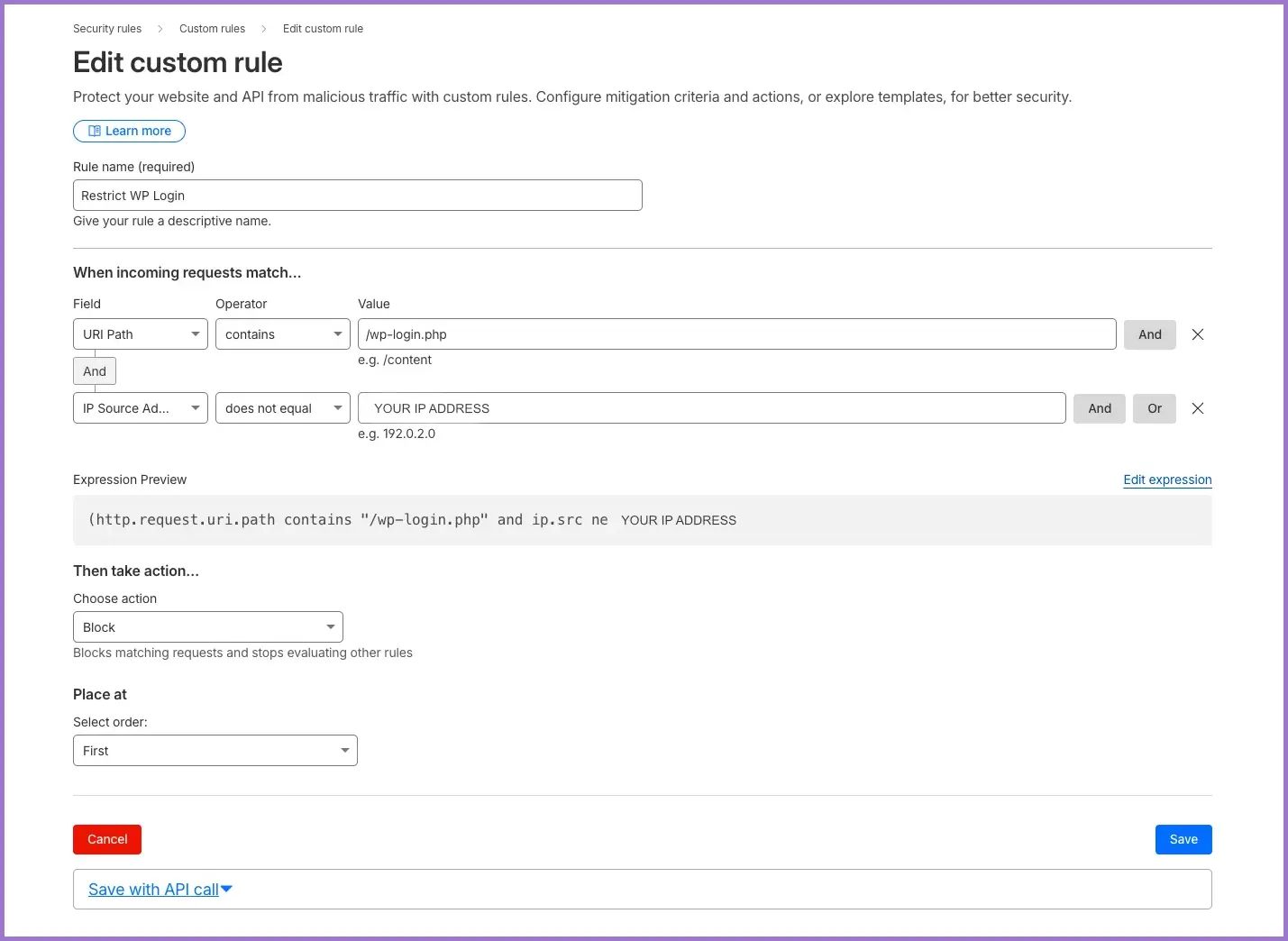
3. Cloudflare portal: protect wp-login.php
This protects against unauthorised access.
Add a custom rule under Cloudflare Security rules → Custom rules to protect wp-login.php and /wp-admin.
4. Create the app repo (your-org/coach)
This creates the WordPress application repository that Flux will pull and reconcile.
4.1 Create the GitLab project
- Group:
website - Project:
your-org/coach - Clone URL (HTTPS):
https://your-gitlab.example.com/your-org/coach.git
4.2 Give Flux read access (Deploy Key)
Enable the same Flux deploy key you already use (flux-ssh-auth) as read-only:
- GitLab project → Settings → Repository → Deploy Keys
- Enable existing key
flux-ssh-auth(read-only)
If you must recover the public key from the cluster (prefer your original copy instead):
kubectl -n flux-system get secret flux-ssh-auth   -o jsonpath='{.data.identity}' | base64 -d > /tmp/flux_id
ssh-keygen -y -f /tmp/flux_id > /tmp/flux_id.pub
# paste /tmp/flux_id.pub into Deploy Keys (Read-only)
rm -f /tmp/flux_id /tmp/flux_id.pub
4.3 Clone and create structure
mkdir -p ~/Projects/website && cd "$_"
git clone ssh://git@git-ssh.example.com/your-org/coach.git
cd coach
mkdir -p k8s/prod
git switch --create main
touch README.md
git add README.md
git commit -m "add README"
git push --set-upstream origin main
5. Next steps
Proceed to the app manifests document to create the Kubernetes resources under k8s/prod/.
If the namespace wp-coach does not exist yet, create it via flux-config before expecting the app Kustomization to reconcile cleanly.
6. Verification checklist
flux --versionandkubectl version --clientreturn expected outputs- GitLab repo
your-org/coachexists and has amainbranch - Deploy key
flux-ssh-authis enabled read-only for the project