Post deployment process
Use this runbook when you want to work on changes (such as auth hardening) in the Blaster repo, without impacting the main deployment flow. It assumes main is your production branch and develop is your integration branch.
Blaster GitOps series
- Blaster GitOps summary
- Blaster repo and branches
- Dockerfile & GitLab CI
- Blaster prep for automation
- Dev app k8s manifests
- Dev flux sources & Kustomizations
- Dev image automation
- Dev SOPS & age
- Dev verification & troubleshooting
- Prod overview
- Prod app k8s manifests and deployment
- Prod Flux GitOps and image automation
- Prod Cloudflare, Origin CA and tunnel routing
- Post development branches - you are here
1. Branch roles
- main
- Production branch.
- Only updated via merge requests from
developwhen you are ready to release.
- develop
- Integration branch.
- All feature branches merge into
developfirst.
- feature branches (e.g.
security/hardening-auth)- Short-lived branches for specific changes.
- Created from
developand merged back intodevelopvia merge request.
GitLab keeps main as the default branch. That is fine: you will change the target of each feature merge request to develop instead of main.
2. Refresh local branches from origin
Before creating or updating a feature branch, sync from origin.
# Make sure you are on develop
git checkout develop

# Fetch and rebase onto the latest origin/develop
git fetch origin
git pull --rebase origin develop
If you also need the latest main (for example before a release MR):
git checkout main
git fetch origin
git pull --rebase origin main
Both develop and main branches will change to reflect the new tags after the image registry is automatically updated. Always checkout and fetch both before working on a feature.
3. Create a security hardening branch from develop
Create your feature branch from develop so it includes the latest integrated work.
git checkout develop
git checkout -b security/hardening-auth
Switched to a new branch 'security/hardening-auth'
4. Push branch and track upstream
Push the new branch and set the upstream tracking reference.
git push -u origin security/hardening-auth
Total 0 (delta 0), reused 0 (delta 0), pack-reused 0 (from 0)
remote:
remote: To create a merge request for security/hardening-auth, visit:
remote:   https://your-gitlab.example.com/your-org/blaster/-/merge_requests/new?merge_request%5Bsource_branch%5D=security%2Fhardening-auth
remote:
To https://your-gitlab.example.com/your-org/blaster.git
 * [new branch]      security/hardening-auth -> security/hardening-auth
branch 'security/hardening-auth' set up to track 'origin/security/hardening-auth'.
5. Keep your feature branch up to date with develop
As other work lands in develop, periodically rebase your feature branch so it stays current.
# On your feature branch
git checkout security/hardening-auth

# Update local develop
git checkout develop
git fetch origin
git pull --rebase origin develop

# Rebase feature branch onto latest develop
git checkout security/hardening-auth
git rebase origin/develop
If the rebase rewrites commits that are already on the remote, update the remote branch safely:
git push --force-with-lease origin security/hardening-auth
--force-with-lease only updates the remote if it still matches the commit you last fetched, so you do not clobber other people’s work by accident.
6. Confirm clean working tree
Before you switch branches or pull with rebase, make sure your working tree is clean (or changes are committed/stashed).
git status
On branch security/hardening-auth
Your branch is up to date with 'origin/security/hardening-auth'.

nothing to commit, working tree clean
If you see uncommitted changes, either commit them or stash them before rebasing or switching branches.
7. Create a merge request targeting develop
GitLab will suggest main as the default target branch. Change this to develop for feature work.
From the GitLab UI:
- Click Create merge request for
security/hardening-auth. - In the MR form, check the line:
Source branch: security/hardening-auth → Target branch: main - Click on
mainand change it todevelopfrom the dropdown. - Confirm it now reads:
security/hardening-auth → develop - Add a clear title and description, then create the merge request.
If an MR was already created with main as the target:
- Open the merge request.
- Click Edit.
- Change Target branch from
maintodevelop. - Save.
8. Merge into develop
Once the pipeline for the merge request is green and you are happy with the review:
- Ensure the MR still targets
develop. - Click Merge.
security/hardening-authis now integrated intodevelop.
At this point:
- Kubernetes dev/prod deployments are still controlled by Flux and the GitOps manifests.
mainremains unchanged until you deliberately cut a release fromdevelop.
9. Release from develop to main
When you are ready to promote a set of changes to production:
- Make sure
developis green and deployed as expected in your non-prod environment. - Create a merge request with:
Source branch: develop → Target branch: main - Review, run any final checks, and then merge.
This keeps main as a clean record of what is actually in production, while day-to-day work flows through develop and short-lived feature branches.
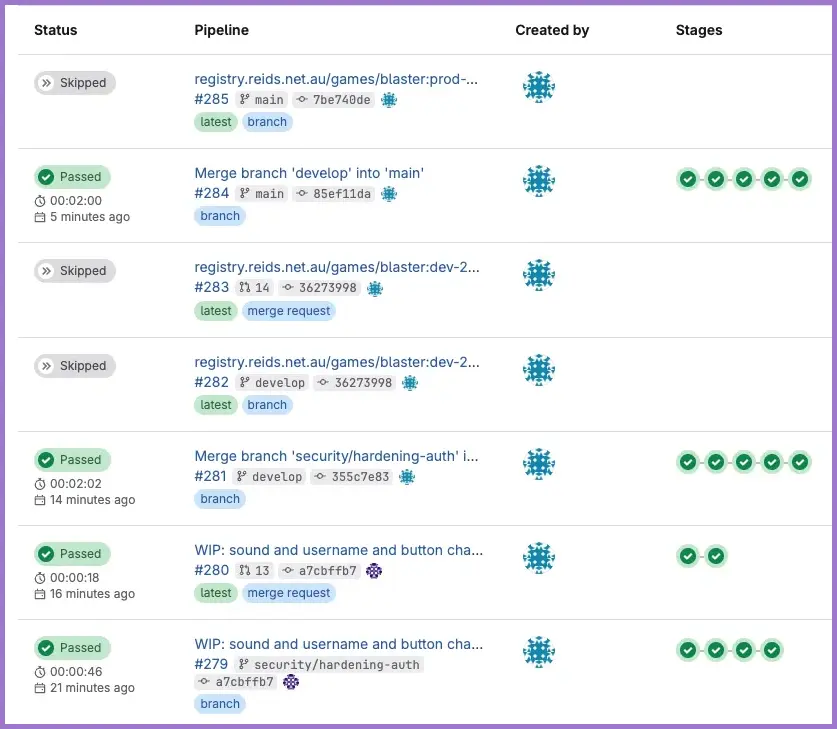
The image shows the entire flow from the security/hardening-auth branch commit, through develop merge request, updating the dev image registry automatically, merging the develop branch to production (main) and updating the prod image registry automatically.
10. Disable auto-delete and clean up feature branches
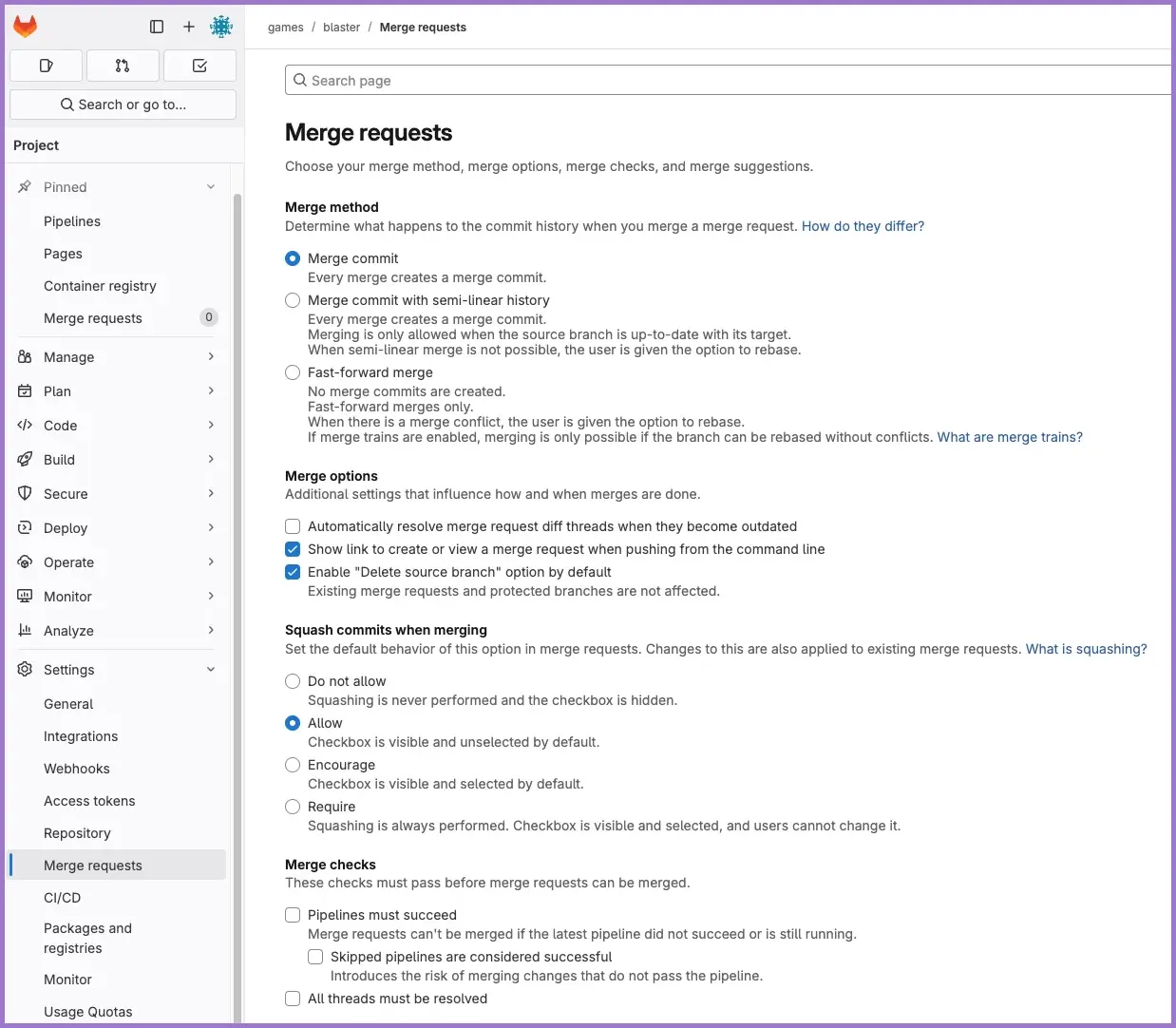
To avoid surprises like GitLab deleting your source branch while your local checkout still exists, disable automatic source-branch deletion and use a simple manual clean-up flow.
10.1 Disable automatic source branch deletion
In GitLab for the your-org/blaster project:
- Go to
Settings→Merge requests. - In Merge options, untick "Enable "Delete source branch" option by default".
- Save the settings.
Your merge requests will still offer a "Delete source branch" checkbox, but it will start unchecked so you consciously decide when to delete a branch.
GitLab merge requests settings screen:
10.2 Clean up a feature branch after merge
After the merge request from your feature branch (for example security/hardening-auth) into develop has been merged:
-
Make sure
developis up to date locally:git checkout developgit fetch origingit pull --rebase origin develop -
Delete the remote feature branch from GitLab:
git push origin --delete security/hardening-auth -
Prune stale tracking references:
git fetch origin --prune -
(Optional but recommended) Verify the feature branch has no unique commits compared to
develop:git log --oneline --graph --decorate develop..security/hardening-authgit diff --stat develop..security/hardening-authIf both commands show no output,
security/hardening-authis just a label on the same commit asdevelopand is safe to delete. -
Delete your local feature branch (safe delete, only allowed if it is fully merged):
git checkout developgit branch -d security/hardening-authIf Git complains that it is not fully merged, inspect with
git logbefore consideringgit branch -D. -
Create your next feature branch from the updated
develop:git checkout developgit checkout -b security/next-hardening-thinggit push -u origin security/next-hardening-thing
This keeps your branch list tidy, avoids stale tracking refs, and prevents surprises from GitLab auto-cleaning branches you still have checked out locally.
11. Verification checklist
- Local integration branch is
developand up to date withorigin/develop. - Feature branch (for example
security/hardening-auth) was created fromdevelop. - Feature branch tracks
origin/security/hardening-authand is regularly rebased ontoorigin/develop. - No uncommitted changes before rebasing or switching branches.
- Merge request exists in GitLab with target branch =
develop, notmain. -
mainis only updated via merge requests fromdevelopwhen you are ready to release. - After merge, feature branches are cleaned up using the manual flow (remote delete, prune, optional verify, local delete, new branch from
develop).