Self-hosted scheduling with Cal.com

Subscriptions in WordPress are my last SaaS dependencies and I am getting rid of them for good.
Even though I host WordPress on my own infrastructure, I don't particularly like it. Not just from a cost perspective but also the management overhead, with almost daily plugin updates.
I already operate a statically generated site, which is great as its attack vectors are tiny compared with my website running WordPress.
I have three subscriptions that were keeping me on WordPress: outbound email, content management, and meeting scheduling. The first two were straightforward to replace but they are only there to support the scheduling plugin. Replacing it meant building something myself or finding an open-source alternative.
I seriously considered building my own, and maybe I will in the future, but time was more pressing so I can cancel the subscriptions before renewal time. Connecting a couple of open source tools and running them in my cluster turned out to be the answer. It wasn't straightforward, but with a bit of extra effort it would work.
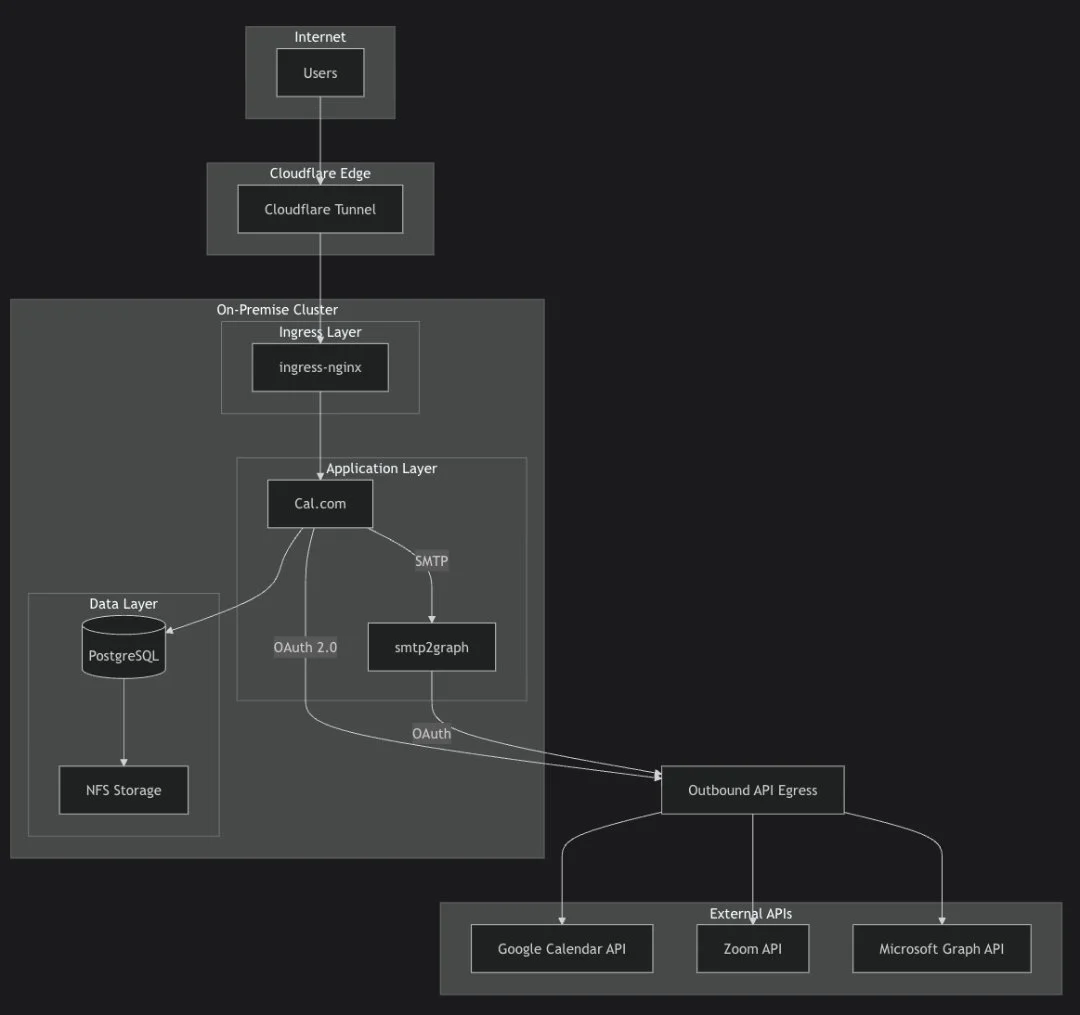
After researching, I selected Cal.com which syncs with Google Calendar and generates Zoom meeting links automatically. The setup required OAuth configuration for each integration. I spent more time than I'd like to admit adding the right redirect URLs and scopes in my Zoom app, but once connected they work like the paid version does.
However, Cal.com does not support Microsoft OAuth for email, and I wasn't going to put holes in my security to allow legacy protocols.
Instead of re-engineering the solution I added a small, locked down, SMTP email relay between the calendar app and O365 that supports modern auth and uses Microsoft Graph (once I figured out where they moved it in the Entra portal). Is there a team in Microsoft dedicated to just moving things around in there?
The whole stack now runs on repurposed desktop computers I recovered from my shed. PostgreSQL stores the bookings on my NAS, Cloudflare Tunnel handles secure access without exposing any ports, and Flux deploys updates automatically when I push changes to Git.
To ensure the GitOps flow worked, I deleted everything and let FluxCD rebuild it from scratch.
Once the scheduling is proven, I will be fully hosting all my content statically with Cloudflare Pages (free plan), and the dynamic pages within my cluster at zero cost. No more WordPress and no more annual invoices for features I can host or build myself.
I'm Andy, I may suck at many things but that doesn't stop me from trying.
Read more: Meeting scheduling