Cursor sync daemon
This page covers the cursor-sync daemon that runs locally on your Mac to fetch and sync Cursor AI usage data.
Flow Control series
- Flow Control
- Architecture
- Cursor sync daemon - You are here
- Music sync daemon
- Health sync daemon (disabled)
- HealthSync iOS app
- Deployment
Why a local daemon?
Cursor AI stores detailed usage data in their cloud, but provides no official API for personal users. The "Admin API" requires an Enterprise plan. I discovered that Cursor stores auth tokens locally and exposes usage via undocumented APIs that work for all plans.
| Challenge | Solution |
|---|---|
| No official API | Undocumented /dashboard/get-filtered-usage-events endpoint |
| Auth token locked locally | Read from Cursor's SQLite database |
| Cannot run from Kubernetes | Local daemon on Mac where Cursor runs |
| Need secure token handling | better-sqlite3 for parameterised queries |
The discovery
The cursor-usage-monitor VS Code extension revealed that:
- Cursor stores auth tokens in a local SQLite database (
state.vscdb) - The dashboard API works for all plans, not just Enterprise
- The endpoint returns detailed per-request data with timestamps, models, and costs
This means you can build automated sync without the Enterprise Admin API.
How it works
Token location
| Platform | Path |
|---|---|
| macOS | ~/Library/Application Support/Cursor/User/globalStorage/state.vscdb |
| Linux | ~/.config/Cursor/User/globalStorage/state.vscdb |
Data extracted
Each event includes:
| Field | Description |
|---|---|
| timestamp | Precise request time (ms resolution) |
| model | AI model (e.g., claude-4.5-opus) |
| kind | Request type (Included, USAGE_EVENT_KIND_USAGE_BASED) |
| inputTokens | Input token count |
| outputTokens | Output token count |
| cacheReadTokens | Cache read tokens |
| cacheWriteTokens | Cache write tokens |
| costCents | Per-request billed cost |
Installation
1. Build the daemon
cd ~/Projects/tools/cursor-sync
npm install
npm run build
2. Create log directory
mkdir -p ~/Library/Logs/cursor-sync
chmod 700 ~/Library/Logs/cursor-sync
3. Configure launchd
Create ~/Library/LaunchAgents/com.example.cursor-sync.plist:
<?xml version="1.0" encoding="UTF-8"?>
<!DOCTYPE plist PUBLIC "-//Apple//DTD PLIST 1.0//EN" "http://www.apple.com/DTDs/PropertyList-1.0.dtd">
<plist version="1.0">
<dict>
    <key>Label</key>
    <string>com.example.cursor-sync</string>

    <key>ProgramArguments</key>
    <array>
        <string>/usr/local/bin/node</string>
        <string>/Users/YOUR_USER/Projects/tools/cursor-sync/dist/index.js</string>
    </array>

    <key>EnvironmentVariables</key>
    <dict>
        <key>STATS_DASHBOARD_URL</key>
        <string>https://your-stats.example.com</string>
        <key>STATS_API_KEY</key>
        <string>your-api-key-here</string>
        <key>POLL_INTERVAL</key>
        <string>300000</string>
        <key>DEBUG</key>
        <string>false</string>
    </dict>

    <key>RunAtLoad</key>
    <true/>

    <key>KeepAlive</key>
    <true/>

    <key>StandardOutPath</key>
    <string>/Users/YOUR_USER/Library/Logs/cursor-sync/cursor-sync.log</string>

    <key>StandardErrorPath</key>
    <string>/Users/YOUR_USER/Library/Logs/cursor-sync/cursor-sync.error.log</string>
</dict>
</plist>
Replace:
YOUR_USERwith your macOS usernameyour-stats.example.comwith your dashboard URLyour-api-key-herewith the API key from your Kubernetes secret
4. Load the service
launchctl load ~/Library/LaunchAgents/com.example.cursor-sync.plist
5. Verify
# Check if running
launchctl list | grep cursor-sync

# View logs
tail -f ~/Library/Logs/cursor-sync/cursor-sync.log
Configuration
| Variable | Default | Description |
|---|---|---|
STATS_DASHBOARD_URL | Required | Dashboard base URL |
STATS_API_KEY | Required | API key for authentication |
POLL_INTERVAL | 300000 | Sync interval in ms (5 minutes) |
DEBUG | false | Enable verbose logging |
API limitation
The Cursor API only returns billed events (USAGE_EVENT_KIND_USAGE_BASED). Events within your subscription allowance (Included) are not returned.
| Event Kind | Returned by API | Available in CSV |
|---|---|---|
USAGE_EVENT_KIND_USAGE_BASED | Yes | Yes |
Included | No | Yes |
To get complete usage data including Included events, periodically export CSV from cursor.com and import via the "Import CSV" button on the dashboard's Sources page. The CSV import also corrects any stale preliminary costs from the API.
Cost field priority
The daemon prioritises usageBasedCosts over tokenUsage.totalCents:
// Get cost (prefer usageBasedCosts - actual billed cost)
let costCents = 0;
if (rawEvent.usageBasedCosts) {
  costCents = parseFloat(rawEvent.usageBasedCosts.replace(/[$,]/g, '')) * 100;
} else if (rawEvent.tokenUsage?.totalCents) {
  costCents = rawEvent.tokenUsage.totalCents;
}
Why: usageBasedCosts is what Cursor actually bills. tokenUsage.totalCents is a theoretical token cost that sometimes differs.
Heartbeat tracking
The daemon sends identification with every sync request:
| Field | Example | Purpose |
|---|---|---|
daemon.id | my-mac-cursor-sync | Unique identifier |
daemon.hostname | my-mac.local | Machine name |
daemon.version | 1.4.0 | Daemon version |
This enables the dashboard to show accurate status:
- "Daemon connected" vs "No Cursor activity since X"
- "Daemon offline (last seen X ago)"
Security
| Control | Implementation |
|---|---|
| Token handling | Read-only, never logged, 60s cache |
| SQLite access | better-sqlite3 with parameterised queries |
| Log permissions | ~/Library/Logs/cursor-sync/ with 700 perms |
| HTTPS enforcement | Warning logged for non-HTTPS URLs |
| API authentication | Bearer token in Authorization header |
Cost discrepancy alerts
The daemon detects when usageBasedCosts diverges from tokenUsage.totalCents by more than 20%:
Alerts are sent to /api/alerts/cost-discrepancy and displayed in the dashboard UI.
Upsert behaviour
The daemon import endpoint upserts instead of skipping duplicates. When a matching event is found (by timestamp + model), it compares cost and token fields. If they differ, the existing record is updated.
Why: The Cursor API can return preliminary cost values that differ from final billed amounts. Without upsert, stale costs remain in the database permanently.
Daily re-sync
Once per 24 hours, the daemon re-fetches the entire current billing period instead of just the 5-minute incremental window. This catches cost corrections automatically.
| Property | Value |
|---|---|
| Interval | Every 24 hours |
| Start date | Billing anchor (13th of month) |
| Combined with | Upsert logic (corrects stale costs) |
Billing period calculation: Cursor billing anchors on the 13th. If today is the 20th, the period started on the 13th of this month. If today is the 5th, the period started on the 13th of last month.
Batch sending
Events are sent in batches of 500 to avoid HTTP 413 errors. On the initial 30-day lookback or daily re-sync, the daemon may fetch 4,000+ events that would exceed nginx's body size limit in a single request.
Sync Now
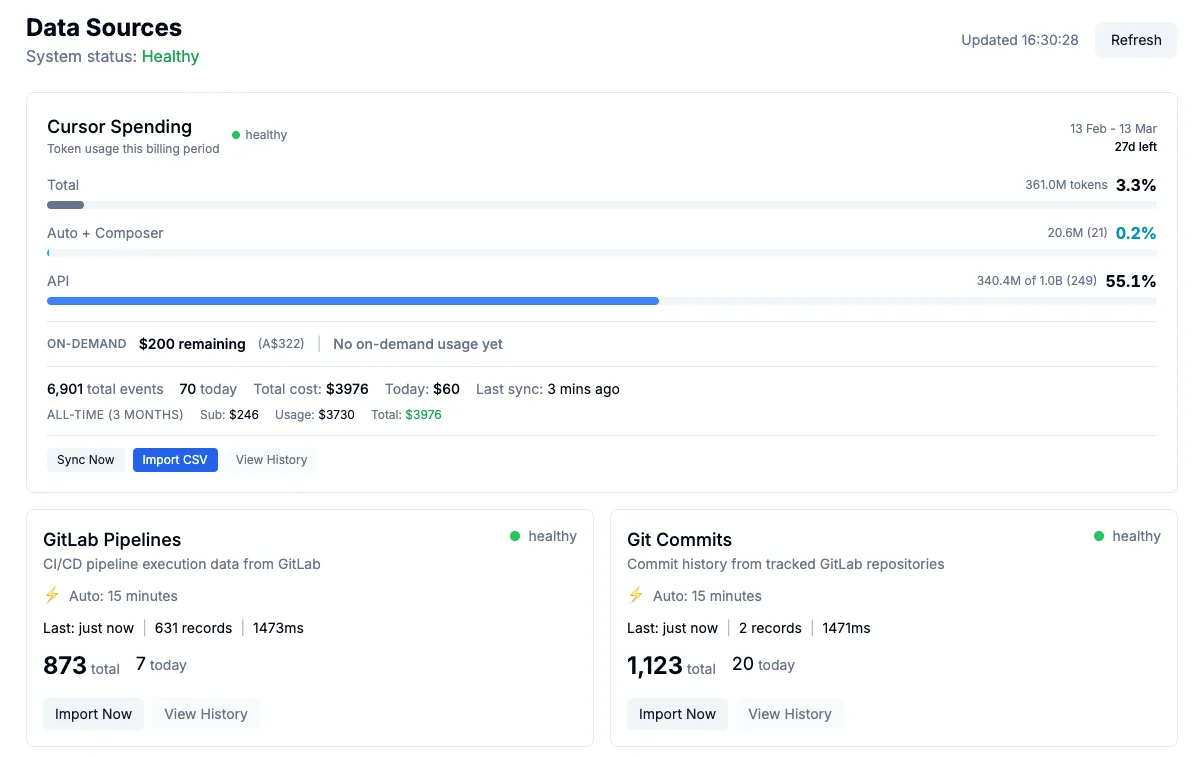
The dashboard has a "Sync Now" button on the Cursor Budget card that triggers an immediate sync instead of waiting for the next 5-minute interval. The daemon polls for sync requests every 15 seconds, so the response is near-instant.
When costs don't match
Cursor's API returns per-request costs at the time of the request, but the amount you are actually charged can differ. Promotional discounts, credits, and pricing adjustments all happen server-side after the fact. The dashboard detects this drift automatically using the cost discrepancy alert system (see below), and CSV import provides the authoritative correction.
If you notice the dashboard's on-demand total does not match Cursor's spending page, import a fresh CSV. The CSV carries the final charged amounts and will overwrite any stale preliminary costs.
The billing cycle anchors on the 13th of each month at 07:00 UTC (midnight US Pacific), aligned to Cursor's actual billing renewal time.
CSV import
For immediate cost corrections (rather than waiting for the daily re-sync), you can import a CSV export from cursor.com:
- Go to cursor.com Settings, Usage, Download CSV
- On the dashboard Sources page, click "Import CSV" on the Cursor Budget card
- Select the downloaded CSV file
The CSV is treated as the authoritative data source. It upserts by timestamp + model, correcting any stale preliminary costs. The parser is header-driven, so it tolerates new columns Cursor adds over time (such as Cloud Agent ID and Automation ID) without breaking. A per-row cost cap of $100 prevents erroneous imports.
Troubleshooting
Daemon not syncing
# Check logs
tail -100 ~/Library/Logs/cursor-sync/cursor-sync.log

# Common issues:
# - STATS_API_KEY mismatch
# - Dashboard URL incorrect
# - Cursor not running (no token)
Token not found
The daemon reads from Cursor's SQLite database. If Cursor is not installed or has never been run, the token will not exist.
# Check if database exists
ls -la ~/Library/Application\ Support/Cursor/User/globalStorage/state.vscdb
API returning empty
If the API returns no events, check:
- You have used Cursor recently
- You are on a paid plan (free tier may not have usage data)
- Your Cursor session is active (re-login if needed)
Next: Music sync daemon covers the daemon that syncs Apple Music listening data.