Deployment
This page covers deploying the school platform to Kubernetes with Flux GitOps, including NFS storage, database backup infrastructure, CI/CD pipeline, and operational commands.
School Platform series
- School Platform
- Architecture
- AI features
- Calendar integration
- Programme
- Explainers
- Schedule
- Integrations
- Deployment - You are here
Deployment patterns
All patterns mirror the coaching platform for consistency across my cluster:
| Pattern | Implementation |
|---|---|
| Image tagging | prod-YYYYMMDD.{pipeline_id} |
| PV naming | {app}-{env}-pv, {app}-{env}-db-pv |
| Secret naming | {app}-app-secret, {app}-db-secret, {app}-registry |
| DB deployment | Deployment with Recreate strategy (not StatefulSet) |
| Secret encryption | SOPS with age |
Two-repo pattern
Two repositories are involved:
- App repo (
school/platform) - application code andk8s/prod/manifests - flux-config repo - Flux objects in
clusters/my-cluster/school-platform/
NFS storage
The platform uses three NFS paths from the QNAP NAS:
| PV path | Purpose | Created by |
|---|---|---|
/school | Platform storage (evidence uploads) | NAS admin |
/school/db | PostgreSQL data | NAS admin |
/school/backups | Database backups | NAS admin |
The database volume mount uses subPath: postgres to create a subdirectory within the NFS mount.
Database as Deployment
PostgreSQL runs as a Deployment with Recreate strategy rather than a StatefulSet. This is simpler for single-replica databases on NFS:
strategy.type: Recreateensures the old pod stops before the new one starts (required for single-writer persistent storage)securityContext.fsGroup: 999(postgres group) is required for NFS file permissions
Prisma migrate CI stage
Database migrations run as a dedicated CI stage (migrate) between test and build. The job executes prisma migrate deploy against the production database via a port-forward, ensuring the schema is up to date before the new image is built. This replaced the earlier schema-sync init container approach.
The migrate stage also runs prisma db seed which is idempotent. Seed files use a safe-fields-only policy: they never overwrite progress fields (earned, earnedAt, startedAt, completedAt, notes, status). To force-overwrite all content from seed data, set SEED_FORCE_CONTENT=true.
Database seeding
The seed workflow runs automatically in CI but can also be triggered manually:
# Port-forward to the database pod
kubectl port-forward -n school deployment/school-platform-db 5433:5432

# Run seed with the port-forwarded connection
DATABASE_URL="postgresql://user:pass@localhost:5433/school" npx prisma db seed
Content updates from seed files are replayable on every deploy. Admin-edited content survives re-deploys unless SEED_FORCE_CONTENT=true is set.
CI/CD pipeline
The GitLab CI pipeline has four stages:
| Stage | Job | When | What |
|---|---|---|---|
| lint | lint | All pushes | ESLint check |
| test | test | All pushes | Test suite |
| migrate | migrate:prod | Push to main only | prisma migrate deploy and prisma db seed against production |
| build | build:main | Push to main only | Build and push Docker image with Kaniko |
Images are tagged with prod-YYYYMMDD.{pipeline_id}. The pipeline skips when the commit message contains [skip ci], which is used by Flux ImageUpdateAutomation to prevent infinite loops.
Database backup infrastructure
The platform includes automated daily backups with 30-day retention and Slack notifications.
Backup CronJob
A Kubernetes CronJob runs daily at 3:00 AM AWST (Australia/Perth timezone):
- Creates a timestamped SQL dump using
pg_dump | gzip - Saves to
/backups/school_platform_YYYYMMDD_HHMMSS.sql.gz - Deletes backups older than 30 days
- Logs completion with file size
| Resource | Name | Purpose |
|---|---|---|
| PersistentVolume | school-backups-pv-prod | NFS storage for backups |
| PersistentVolumeClaim | school-backups | Mounts /backups in pods |
| CronJob | school-platform-db-backup | Daily backup with cleanup |
Slack notifications
All backup and restore events are posted to a Slack channel:
| Event | Example |
|---|---|
| Backup success | [Cron] School Platform -- Backup completed |
| Backup failure | [Manual] School Platform -- Backup FAILED |
| Restore started | [Restore] School Platform -- Started |
| Restore completed | [Restore] School Platform -- Completed successfully |
| Restore failure | [Restore] School Platform -- FAILED |
Backup verification
Each backup can have a .meta.json sidecar file containing metadata: timestamp, table counts, pg_dump version, file size, and a verified flag. The verification endpoint checks gzip integrity, collects metadata, and checks schema compatibility.
| Status | Meaning |
|---|---|
| compatible | Backup migration matches current app |
| needs-migration | Backup is older, migrations will run on restore |
| unknown | No migration info |
Restore process
- Creates a safety backup before any restore
- Posts Slack notification that restore is starting
- Drops and recreates the database
- Loads backup via
psql - Runs
prisma migrate deployif migrations exist - Posts Slack notification on success or failure
Admin UI
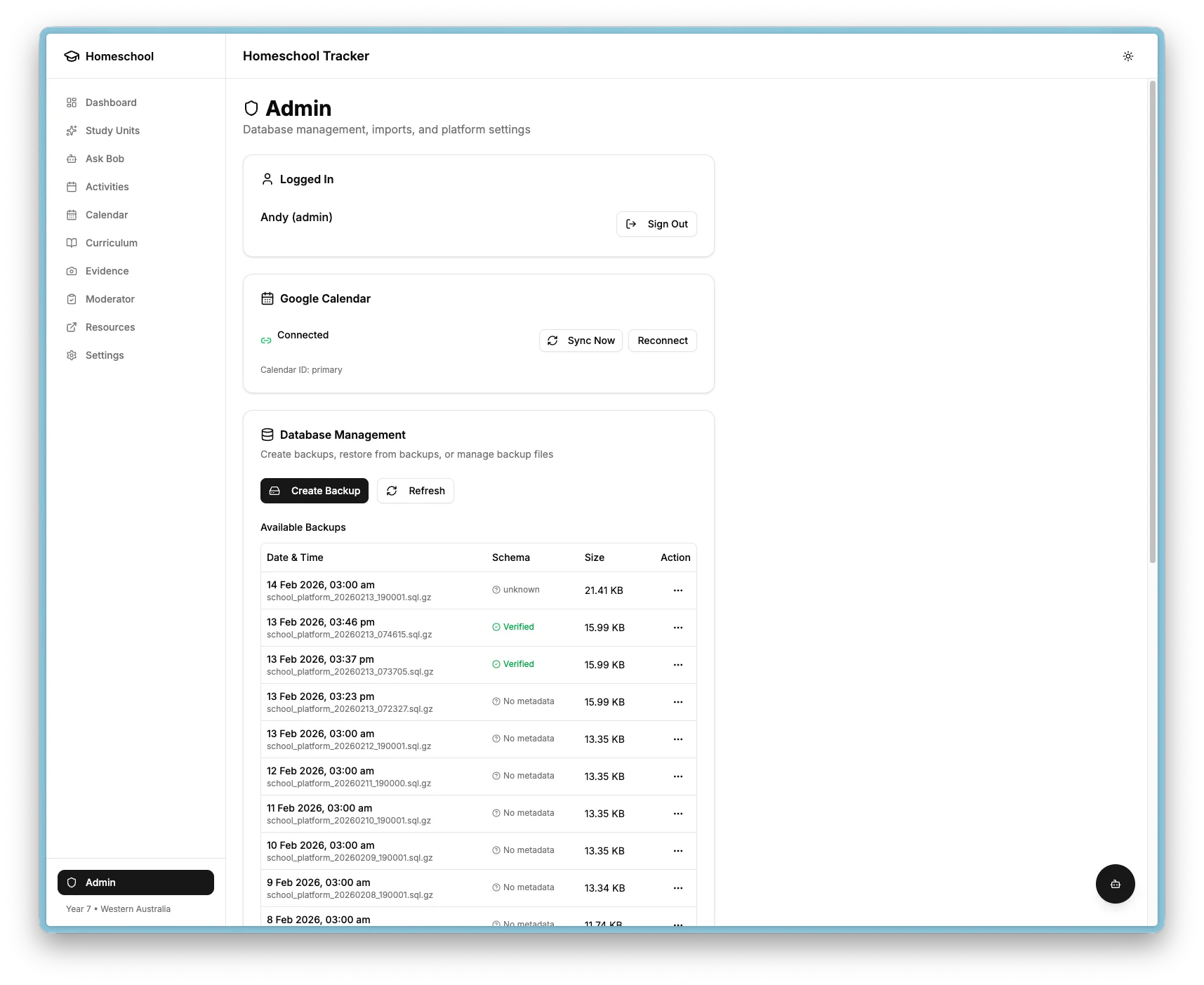
The Admin page provides a backup management table where you can view backup history with timestamps, sizes, and verification status. From there you can create manual backups, verify integrity and compatibility, restore from any backup with a confirmation dialog, and delete old backups.
Kubernetes manifests
The k8s/prod/ directory contains 17 manifests:
| File | Purpose |
|---|---|
kustomization.yaml | Kustomize configuration |
05-secret-registry.enc.yaml | Registry pull secret (SOPS encrypted) |
10-secret-app.enc.yaml | App secrets (SOPS encrypted) |
20-secret-db.enc.yaml | Database secrets (SOPS encrypted) |
25-pv-platform.yaml | Platform storage PV |
27-pv-backups.yaml | Backup storage PV |
28-pvc-backups.yaml | Backup storage PVC |
30-pvc-platform.yaml | Platform storage PVC |
35-pv-db.yaml | Database PV |
36-pvc-db.yaml | Database PVC |
40-db-statefulset.yaml | PostgreSQL Deployment and Service |
50-app-deployment.yaml | App Deployment and Service |
60-ingress.yaml | Ingress with TLS |
70-cronjob-db-backup.yaml | Daily backup CronJob |
75-cronjob-calendar-sync.yaml | Hourly calendar sync CronJob |
80-cronjob-learning-scraper.yaml | Daily Playwright scraper CronJob (18:15 Perth) |
85-secret-scraper.enc.yaml | Scraper secrets (SOPS encrypted) |
Monitoring
The platform is monitored via the cluster observability stack:
| Layer | Tool | What is monitored |
|---|---|---|
| Pod health | Prometheus and kube-state-metrics | Crashes, restarts, OOM |
| Logs | Alloy to Loki | All stdout collected |
| Node resources | node-exporter | Disk, CPU, memory |
| External availability | Uptime Kuma | HTTP health check every 60 seconds |
Operational commands
# View application logs
kubectl logs -n school deployment/school-platform -f

# View database logs
kubectl logs -n school deployment/school-platform-db

# Restart the application
kubectl rollout restart deployment/school-platform -n school

# Trigger a manual backup
kubectl create job --from=cronjob/school-platform-db-backup manual-backup -n school

# Flux reconcile triad (source, then kustomization, then check)
flux reconcile source git school-platform
flux reconcile kustomization school-platform-prod --with-source
flux get kustomization school-platform-prod

# Port-forward for local database access
kubectl port-forward -n school deployment/school-platform-db 5433:5432