Data portability
Export your coaching data as a ZIP file from any edition and import it into any other edition. Your data is never locked to a single platform.
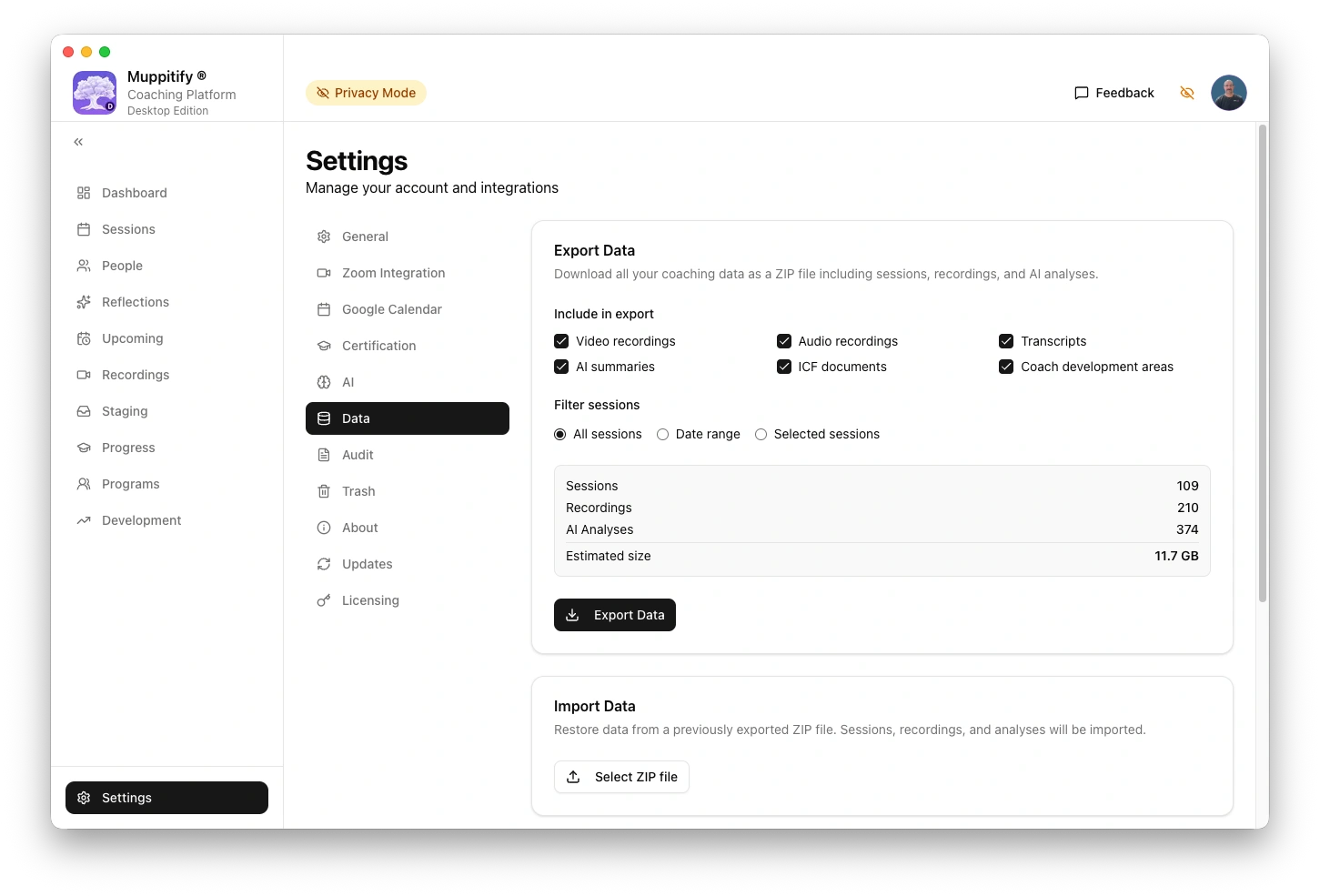
What's included in an export
Every export contains a manifest.json with metadata and data files for each entity type:
- Sessions. All coaching, mentoring, peer coaching, and meeting sessions
- People. Clients, peers, and other contacts
- Recordings. Audio and video files (optional, can be large)
- Transcripts. VTT and TXT transcript files
- AI analyses. Client summaries, coach assessments, competency scores
- Person overviews. Cross-session AI reflections with ICF progress maps
- Overview caches. Session-level and block-level caches for incremental overview updates
- ICF programmes. Peer coaching and mentor coaching programmes with members and session links
- Competency tags. Manual and AI-generated ICF competency markers on transcript segments
- Development areas. Coach development goals, action plans, and progress entries
- ICF certification data. Education courses, mentor coaching sessions, performance evaluations, exam results
- Zoom data. Meeting metadata, recording import history, and speaker mappings (email and name)
- Peer coaching pairs. Linked coach/client session pairs
- AI configuration. Provider settings (model names, endpoints, tuning parameters) and custom prompt templates
- Zoom recordings. Recording metadata linked to meetings
You can filter exports by date range or select specific sessions. Additional checkboxes control whether cross-session AI overviews, Zoom speaker mappings, and AI configuration are included.
Cross-edition compatibility
| From | To K8s | To Server | To Desktop | To Vault |
|---|---|---|---|---|
| K8s | Full | Full | Full | Best-effort |
| Server | Full | Full | Full | Best-effort |
| Desktop | Full | Full | Full | Best-effort |
| Vault | Not supported | Not supported | Not supported | Full |
Full means every data type is imported with all fields preserved. IDs are regenerated and all references are updated automatically.
Best-effort means the Vault edition imports all data types except ICF document binary files (see below). The Vault stores data as markdown files with YAML frontmatter, so some database structures are mapped to embedded YAML arrays.
Not supported means the Vault edition's export format (a ZIP of markdown files) cannot be imported by other editions. Other editions use a JSON-based import format. The Vault is a one-way import destination for cross-edition portability.
Sensitive data protection
Exports never include sensitive credentials:
- API keys are stripped from AI provider configurations. Provider settings like model names, endpoints, and tuning parameters are included so you can see your setup, but keys must be re-entered after import.
- OAuth tokens for Zoom and Google Calendar are excluded entirely. These connections must be re-established in the target edition.
- Account identifiers such as Zoom account IDs and Google account IDs are not exported.
Non-sensitive setup data like server URLs, model names, speaker name mappings, and custom prompt templates are portable and transfer between editions.
Known limitations
ICF document files
ICF document files (PDFs, badge images, certificates) are not included in ZIP exports. Only metadata is exported. After importing into another edition, you will need to re-upload any ICF documents.
Vault to other editions
The Vault edition stores data as markdown files with YAML frontmatter. This format is fundamentally different from the JSON format used by K8s, Server, and Desktop editions. Exporting from Vault and importing into another edition is not currently supported. You can migrate to the Vault edition from any other edition, but not the reverse.
Recommended workflow
To migrate from one edition to another:
- Export from the source edition via Settings > Data > Export
- Import into the target edition via Settings > Data > Import
- Re-upload any ICF documents (certificates, evaluations)
- Re-connect Zoom and Google Calendar in the target edition's settings
- Configure AI providers (re-enter API keys or local endpoints)