Choosing a model
The platform uses AI to evaluate coaching sessions against ICF competency rubrics. The quality of feedback depends on the model you choose.
Not all AI models are equal. Reasoning models and rigorous chat models produce honest, evidence-based assessments. General-purpose chat models tend to produce inflated scores with vague evidence. This page explains the difference and recommends specific models for each supported provider.
| Provider | Recommended model | Assessment quality | Speed |
|---|---|---|---|
| Ollama | qwen3:30b | Critical, evidence-based, zero cost. Standard mode only | Varies by hardware |
| LM Studio | Qwen3.5 35B A3B | Use with caution, optimistic verdicts. Standard mode only | Varies by hardware |
| llama-server | Qwen3.5 35B A3B (GGUF) | Critical, evidence-based, zero cost. Deep analysis with --reasoning-budget | Varies by hardware |
| OpenAI | o3-mini (reasoning) | Honest, critical, evidence-based | Fast |
| Anthropic | claude-sonnet-4-6 | Honest, evidence-based, rigorous | Slower (~4 min) |
| xAI (Grok) | grok-4-1-fast-reasoning | Honest, critical, evidence-based | Very fast (<1 min) |
| Perplexity | sonar-reasoning-pro | Use with caution, optimistic verdicts | Fast |
| Mistral | mistral-large | Untested for coaching assessment | Fast |
| Groq | qwen/qwen3-32b, llama-3.3-70b-versatile | Pending confirmation (see notes) | Very fast |
| Google Gemini | No recommended models | Inflated scores, positivity bias | Fast |
Why reasoning models matter
Most AI chat models are designed to be agreeable. When asked to score a coaching session, they tend to rate everything highly and provide generic feedback like "good use of open questions." This is not useful for professional development.
Reasoning models (OpenAI o-series, Qwen3, DeepSeek-R1) work differently. They evaluate against rubrics systematically rather than generating agreeable text. This produces more honest and actionable coaching feedback, with specific transcript evidence for each competency score.
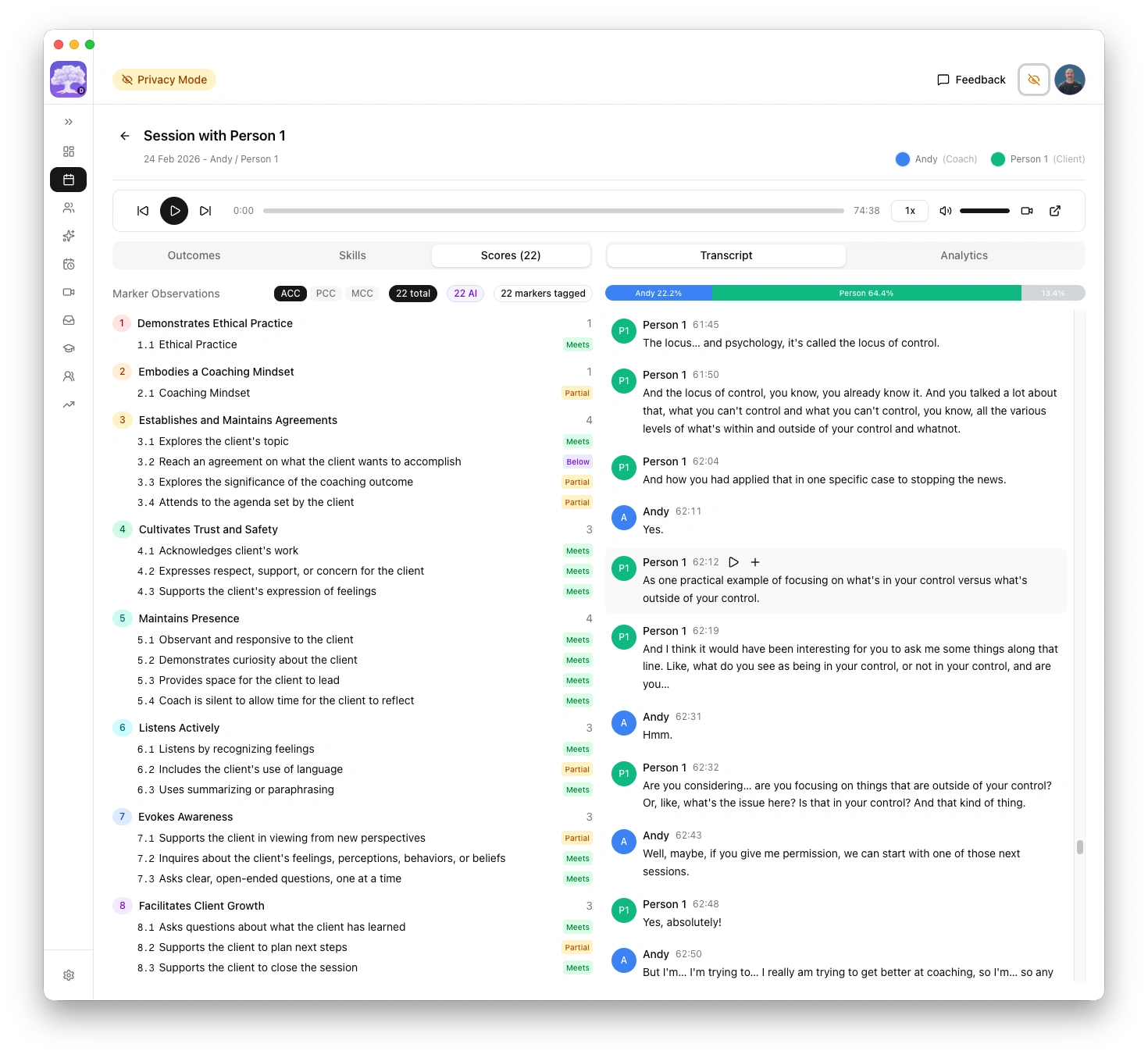
What I tested
I ran a direct comparison using a real coaching session transcript. Both models received the same prompt, the same transcript, and the same parameters (temperature 0.4). Each model evaluated the session against all 22 ICF competency markers.
| GPT-4o | qwen3:30b | |
|---|---|---|
| Markers rated "Meets" | 20 of 22 | 4 of 22 |
| Markers rated "Partially meets" | 1 | 10 |
| Markers rated "Does not fully meet" | 0 | 8 |
| Evidence style | Vague timestamps, many reusing the same reference | Precise timestamps with actual transcript quotes |
| Feedback tone | Positive and flattering | Specific and constructive |
| Submission recommendation | Recommended submission | Recommended against submission |
The same transcript, the same rubric, the same prompt. One model said "nearly perfect." The other identified concrete growth areas with evidence.
Where chat models fall short
Four patterns emerged from the comparison.
1. Evidence quality. GPT-4o repeatedly cited the same vague timestamp for multiple markers, suggesting it did not engage with distinct parts of the transcript. qwen3:30b cited specific, different timestamps with actual quotes for each marker.
2. Critical honesty. The prompt explicitly states "be constructive but honest; coaches need actionable feedback." GPT-4o rated 20 of 22 markers as "Meets." qwen3:30b identified real issues: the coach sharing personal experiences instead of focusing on the client, no explicit session agreement, and an abrupt closing. These are legitimate coaching deficiencies that GPT-4o glossed over.
3. Sycophancy bias. GPT-4o has a well-documented tendency to be agreeable and avoid negative feedback. OpenAI acknowledged this problem publicly in April 2025. For coaching assessment, this makes it counterproductive. Telling a coach everything is "Meets" when there are real growth areas does not help them improve.
4. Actionable feedback. For the same competency marker (supporting expression of feelings), GPT-4o produced vague praise: "You effectively supported the client in expressing their feelings." qwen3:30b produced a specific alternative the coach could use next time: "Reflect feelings: 'It sounds like you feel worried when they don't ask for help, and that's hard to watch.'"
General-purpose chat models optimised for helpfulness and agreeableness are fundamentally unsuited for rubric-based professional assessment where honest, critical feedback is the entire point.
OpenAI: recommended models
| Model | Type | Best for | Approximate cost |
|---|---|---|---|
| o3-mini | Reasoning | Best value. Honest, critical evaluation | ~$1.10 / $4.40 per 1M tokens |
| o3 | Reasoning | Strongest critical analysis, highest quality | Higher cost |
| gpt-4o, gpt-4o-mini | General | Avoid for scoring. Known positivity bias produces inflated scores | Lower cost |
Reasoning models (o-series) evaluate against rubrics systematically rather than generating agreeable text, producing more honest and actionable coaching feedback.
Recommendation: Start with o3-mini. It provides honest, critical feedback at a low cost. Move to o3 if you want the strongest possible analysis and don't mind the higher cost.
Not recommended for coaching assessment
| Model | Reason |
|---|---|
| GPT-4o | Well-documented sycophancy, confirmed by OpenAI |
| GPT-4o-mini | Same fundamental architecture and bias tendencies |
| GPT-4.5 | "Better emotional intelligence" often means more agreeable, not less |
These models are fine for general tasks but produce inflated scores when used for rubric-based coaching evaluation.
Anthropic: recommended models
| Model | Type | Best for | Approximate cost |
|---|---|---|---|
| claude-sonnet-4-6 | Chat (rigorous) | Honest, evidence-based assessments with specific transcript evidence | ~$3 / $15 per 1M tokens |
Claude Sonnet 4.6 is not a reasoning model, but it is significantly less sycophantic than general-purpose chat models. It produces honest assessments with concrete evidence, specific timestamps, and actionable feedback. It is willing to recommend against submission when real gaps exist.
Recommendation: Use claude-sonnet-4-6 if you want rigorous assessments from a cloud provider and prefer Anthropic's privacy stance (API data is not used for training).
Claude assessments for complex sessions (PCC/MCC with 39 markers) take approximately 4 minutes. The platform's default timeout is configured to handle this. If you see timeout errors, increase the timeout in Settings > AI > Advanced tuning.
xAI (Grok): recommended reasoning model
| Model | Type | Best for | Speed |
|---|---|---|---|
| grok-4-1-fast-reasoning | Reasoning | Honest, critical evaluation with specific evidence | Under 1 minute |
Grok's reasoning model produces rigorous, honest assessments comparable to OpenAI o-series and Claude Sonnet. In testing, it recommended against PCC submission for the same session that Claude and o3 also flagged, identifying specific weak markers (3.2, 8.5, 8.7) in agreements, actions, and accountability.
The standout advantage is speed. Grok completed a full PCC assessment in under 1 minute, compared to approximately 4 minutes for Claude Sonnet on the same session. It also provided concrete alternative phrasings with specific timestamps.
Recommendation: Use grok-4-1-fast-reasoning if you want fast, rigorous feedback. Avoid the "non-reasoning" Grok variants (same positivity bias risk as other chat models).
Google Gemini: not recommended for assessment
| Model | Type | Assessment quality |
|---|---|---|
| Gemini 2.5 Flash | Chat | Inflated scores, positivity bias |
| Gemini 2.5 Pro | Chat | Worse than Flash, even more effusive praise |
Neither Gemini Flash nor Gemini Pro is suitable for coaching assessment. Both models exhibit the same sycophancy pattern as GPT-4o, producing inflated scores with vague evidence.
In direct testing with the same coaching session transcript, Gemini 2.5 Flash rated a session as "outstanding candidate for MCC submission" with "masterful level coaching." Claude Sonnet 4.6 assessed the same session as "not yet ready for MCC submission" and identified concrete competency gaps.
Gemini 2.5 Pro was even more effusive than Flash, finding it "difficult" to identify growth opportunities. This confirms that model size alone does not fix positivity bias.
Gemini models are fine for general tasks and have generous free tiers, but if you use them for coaching assessment, treat the results as directional only, not as reliable professional feedback.
Perplexity: use with caution
| Model | Type | Assessment quality |
|---|---|---|
| sonar-reasoning-pro | Reasoning | Specific evidence but optimistic verdicts |
Perplexity's sonar-reasoning-pro is a reasoning model that provides specific timestamps and concrete alternative phrasings. The evidence quality is reasonable, but overall verdicts tend to be more generous than Claude Sonnet or OpenAI o-series on the same transcript.
In testing, sonar-reasoning-pro rated a session as "genuinely PCC-level" and "conditional yes" for MCC submission, while Claude Sonnet assessed the same session as "not yet ready" for either level. The feedback identified some real weaknesses (markers 3.3, 6.3, 7.2, 8.2) but framed them as minor refinements rather than significant gaps.
If using Perplexity for coaching assessment, cross-reference results with a more rigorous model (Claude Sonnet or OpenAI o-series) before acting on submission recommendations. Treat overall verdicts as optimistic.
Note: sonar-reasoning was deprecated in December 2025. Use sonar-reasoning-pro instead.
Mistral: untested
| Model | Type | Notes |
|---|---|---|
| mistral-large | Chat | European provider, data processed in EU |
Mistral is a European AI provider based in Paris. Their models have not been tested for coaching assessment quality. Mistral is included as a supported provider for users who require EU data processing for GDPR compliance.
If you test Mistral for coaching assessment, please share your results so this page can be updated with recommendations.
Groq: pending confirmation
| Model | Type | Notes |
|---|---|---|
| qwen/qwen3-32b | Reasoning (hosted) | Chain-of-thought reasoning, rigorous on Ollama — pending Groq confirmation |
| llama-3.3-70b-versatile | Open-source (hosted) | Largest available model, good general reasoning — pending confirmation |
Groq is an inference provider that runs open-source models on custom LPU (Language Processing Unit) hardware designed for speed. Groq is not a model creator — it hosts models built by others (Meta's Llama, Alibaba's Qwen, Mistral's Mixtral). Your data goes to Groq's infrastructure, not to the model creators.
Groq vs Ollama: Groq offers extremely fast cloud inference with a free tier, while Ollama runs models locally with complete data privacy and no rate limits. If data privacy is your primary concern, use Ollama. If speed and convenience matter more, Groq is a strong alternative.
Data privacy: Groq does not use API inputs or outputs for model training. No data retention by default. Zero Data Retention (ZDR) is available in Groq account settings for stronger guarantees.
Recommended models: qwen/qwen3-32b has been tested as rigorous on Ollama (local) and is expected to perform similarly on Groq. llama-3.3-70b-versatile is the largest model available on Groq and offers good general reasoning. Assessment quality on Groq has not yet been fully confirmed for either model.
The Groq free tier has tokens-per-minute (TPM) limits that are too low for coaching transcripts (which typically exceed 16,000 tokens). You will need the Groq Developer tier to use within the coaching platform. Hard spend limits are available to control costs.
LM Studio: use with caution
| Model | Type | Assessment quality | Speed |
|---|---|---|---|
| Qwen3.5 35B A3B (Q8_0) | MoE reasoning | Good evidence but optimistic verdicts | ~3 min for PCC |
LM Studio runs models locally with complete data privacy. Qwen3.5 35B A3B uses chain-of-thought reasoning (thinking mode) and provides specific timestamps, concrete alternative phrasings, and identifies some real growth areas.
However, in testing against the same session that Claude Sonnet and xAI recommended against PCC submission, Qwen3.5 35B A3B rated 37 of 39 markers as "Meets" and called it a "strong candidate for PCC submission." The evidence quality is good, but the overall verdict is more generous than rigorous cloud models.
If using LM Studio for coaching assessment, cross-reference results with a more rigorous model (Claude Sonnet or OpenAI o-series) before acting on submission recommendations. Treat overall verdicts as optimistic.
Context length setup
LM Studio's default context length (4,096 tokens) is too small for coaching assessments. You must increase it in LM Studio's model settings:
- Minimum: 32,768 tokens (32K) for shorter sessions
- Recommended: 65,536 tokens (64K) for full session transcripts on 64 GB+ systems
After changing the context length in LM Studio, set the matching value in the platform's Settings > AI > Advanced tuning > Context limit field.
System requirements
| System memory | Recommended model | Notes |
|---|---|---|
| 64 GB+ | Qwen3.5 35B A3B (Q8_0) | Best quality, MoE architecture keeps active parameters low |
| 16-32 GB | Qwen3.5 9B (Q8_0) | Good balance of quality and memory usage |
Recommendation: Use LM Studio if you want local, private AI assessments and are comfortable cross-referencing with a cloud model for submission decisions. For rigorous standalone assessments, use OpenAI o-series or Claude Sonnet instead.
llama-server: recommended for advanced local AI
| Model | Type | Assessment quality | Speed |
|---|---|---|---|
| Qwen3.5 35B A3B (Q4_K_M GGUF) | MoE reasoning | Critical, evidence-based, zero cost | Varies by hardware |
llama-server runs models locally with full data privacy and provides an OpenAI-compatible API. It supports server-side reasoning budgets, giving you precise control over how much the model reasons before responding.
Recommended launch command
llama-server \
  -hf unsloth/Qwen3.5-35B-A3B-GGUF:Q4_K_M \
  --temp 0.6 \
  --top-p 0.95 \
  --top-k 20 \
  --min-p 0.00 \
  --flash-attn on \
  --ctx-size 32768 \
  --jinja \
  --reasoning-budget 2048 \
  --host 0.0.0.0 \
  --parallel 1
Required flags
| Flag | Value | Why |
|---|---|---|
--reasoning-budget | 2048 | Controls the thinking token budget. The server enforces this as a soft cap on reasoning tokens before generating the response. Higher values (e.g. 4096) allow more thorough reasoning but increase generation time and risk sycophantic all-green assessments. |
--parallel | 1 | Required. Concurrent requests corrupt the KV cache, causing leaked context between assessments. Always set to 1. |
--jinja | (flag) | Required for Qwen3.5 chat template processing. |
--ctx-size | 32768 | Context window size. Match this to the platform's context limit setting. |
--flash-attn | on | Enables flash attention for faster inference. |
Do not increase --parallel above 1. When multiple requests run concurrently, the KV cache becomes corrupted and assessment context leaks between requests, producing unreliable results.
How reasoning budget works
The --reasoning-budget flag is a server-side control. The platform does not send thinking flags via the API — the server decides how many tokens to spend reasoning based on this budget. Reasoning tokens count against the total max_tokens budget, so the platform sets max_tokens to 16384 to leave room for both reasoning (~2048 tokens) and content (~14K tokens).
Recommendation: Start with --reasoning-budget 2048. This provides enough reasoning for critical analysis without over-thinking. If assessments seem shallow, increase to 4096. If assessments become overly positive (all markers rated "Meets"), reduce the budget.
Ollama: recommended models by system memory
| System memory | Recommended model | Context window | Quality |
|---|---|---|---|
| 16 GB | qwen3:4b or qwen3:8b | 16k to 32k tokens | Faster but less nuanced feedback |
| 32 GB | qwen3:14b | 32k tokens | Good balance of quality and speed |
| 64 GB+ | qwen3:30b or larger | 64k+ tokens | Critical, evidence-based scoring with specific transcript references |
Qwen3 models produce honest, critical coaching feedback with specific transcript evidence. They outperform equivalently-sized models for structured rubric evaluation.
Recommendation: If you have 32 GB RAM or more, start with qwen3:14b. On 16 GB Macs, use qwen3:8b for shorter sessions or consider OpenAI for longer ones.
How memory affects quality
The coaching platform automatically adjusts the context window based on your system memory. With less memory, long transcripts may be truncated, producing shorter assessments.
| System memory | Max context | Effect on long sessions |
|---|---|---|
| 16 GB | 8,192 tokens | May truncate long transcripts |
| 32 GB | 32,768 tokens | Handles most sessions |
| 64 GB | 65,536 tokens | Handles long sessions comfortably |
| 128 GB+ | 131,072+ tokens | No practical limit |
macOS: Click the Apple menu > About This Mac. Your memory is listed as "Memory" (e.g. "16 GB" or "32 GB"). Windows: Open Settings > System > About. Your installed RAM is listed under "Device specifications".
Tips
- If an assessment seems shallow or overly positive, try a reasoning model (OpenAI o-series) or a rigorous chat model (Claude Sonnet)
- If you see "transcript too long" errors, use a cloud provider for that session or try a shorter recording
- If you see timeout errors with Claude, increase the timeout in Settings > AI > Advanced tuning for the Anthropic provider
- You can switch between providers at any time in Settings > AI. Your existing assessments are preserved.
- Generating a new assessment for the same session replaces the previous one